






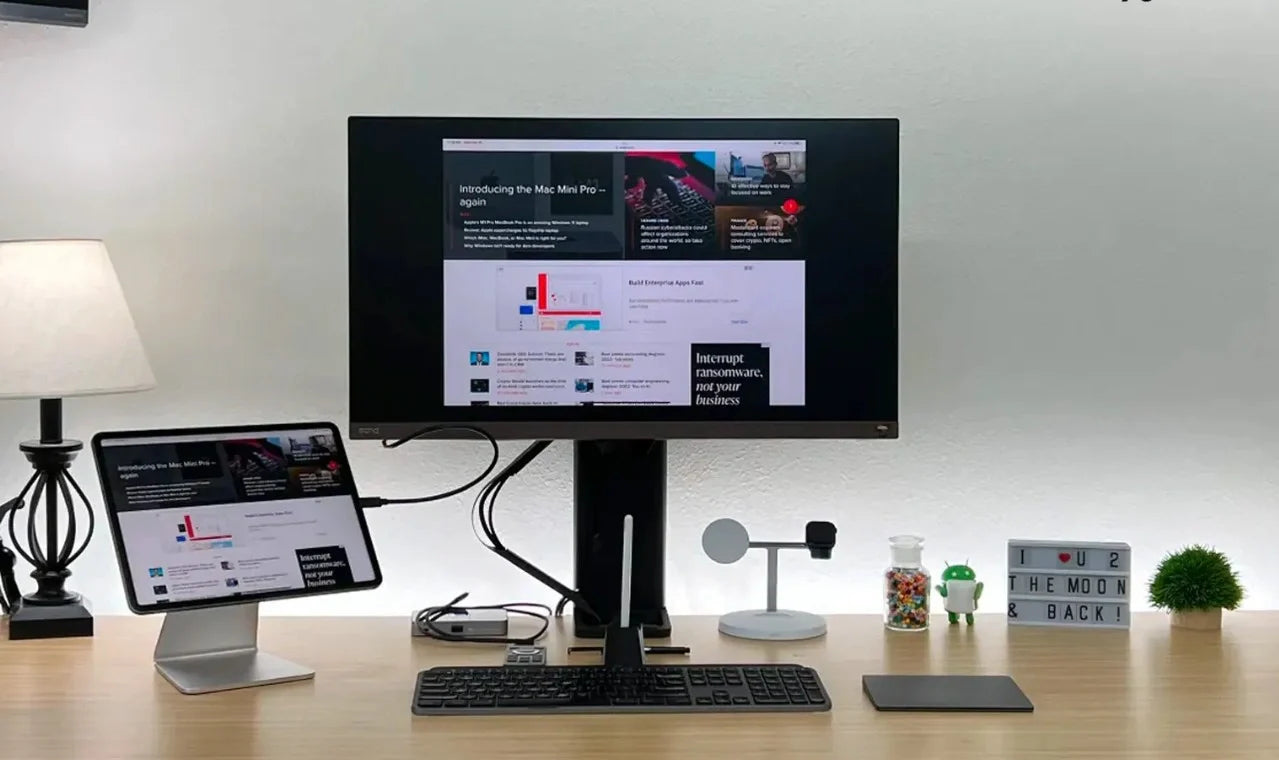
There are 100+ million active iPads worldwide. Every single one of them supports mouse input. And almost none of them are being used with one. Apple added full mouse and trackpad support to iPadOS back in 2020 — cursor, right-click, hover effects, scroll, drag-and-drop and then never shipped a mouse with any iPad.
The Magic Keyboard has a trackpad. The Apple Pencil has precision. But the actual pointing device that would make an iPad function like a real computer? Apple leaves that up to you.
Here's the truth most tech sites won't tell you: a $35 Bluetooth mouse transforms an iPad more than a $300 keyboard case. The keyboard gives you typing. The mouse gives you control — precise cursor placement, right-click context menus, scroll wheel navigation, drag-and-drop between apps in Split View and Stage Manager, and the ability to use your iPad without constantly lifting your arm to touch the screen. If you've ever thought "my iPad could almost replace my laptop," a mouse is the missing piece that makes it real.
At Smart Mouse Co, mice are our entire business. Every mouse in our collection is wireless, Bluetooth-compatible, and tested across the devices people actually use — including every current iPad model. This guide covers the 10 best mice for iPad, ranked by how iPad users actually work, with compatibility details, real use cases, and direct links to every product.
Quick Picks: Best Mouse for iPad by Use Case
| Mouse | Best For | Price | Highlight |
|---|---|---|---|
| Air Nova | Presentations + all-in-one iPad work |
|
⭐ Best Overall |
| Elevate Pro | Ergonomic vertical for long iPad sessions |
|
⭐ Best Ergonomic |
| Touch Flow | Gesture trackpad for iPad |
|
⭐ Best Gesture Input |
| Seeker | Compact travel companion for iPad | $89 | ⭐ Best Travel |
| PenX | Ultra-portable pen mouse | $37.95 | ⭐ Most Portable |
| Verta | Vertical comfort for desk iPad setups | $59 | ⭐ Best Vertical Value |
| ErgoGlide | Ergonomic comfort under $50 | $49.95 | ⭐ Best Mid-Range |
| Lumos | Silent clicks for quiet iPad work | $59 | ⭐ Best Silent |
| Orbit | Trackball for zero desk space | $59 | ⭐ Best Trackball |
| ErgoX | Cheapest wireless mouse for iPad | $34.95 | ⭐ Best Budget |
Browse all 17 Smart Mouse Co mice →
iPad Mouse Compatibility — Which iPads Support Mouse Input?
Every iPad currently sold by Apple supports Bluetooth mouse input. This includes:
| iPad Model | Mouse Support | Stage Manager | External Display |
|---|---|---|---|
| iPad Pro (M4, M2, M1) | ✅ Full cursor + hover | ✅ Yes | ✅ Yes |
| iPad Air (M3, M2, M1) | ✅ Full cursor + hover | ✅ Yes | ✅ Yes |
| iPad Mini (A17 Pro) | ✅ Full cursor | ✅ Yes | ✅ Yes |
| iPad (10th gen, A14) | ✅ Full cursor | ❌ No | ❌ Mirror only |
| Older iPads (iPadOS 13.4+) | ✅ Basic cursor | ❌ No | ❌ No |
How to connect: Settings → Bluetooth → Turn on your mouse → Tap the mouse name when it appears. That's it. No drivers. No apps. No configuration. Every Bluetooth HID-compliant mouse — including every mouse in this guide — pairs in under 30 seconds and works immediately.
What works on iPad with a mouse: Left click, right click (shows context menus), scroll wheel, side buttons (browser back/forward), hover effects (on iPad Pro and Air with M-series chips), and full cursor control in Stage Manager. iPadOS treats Bluetooth mouse input as a first-class pointing system — not an accessibility workaround like it was in earlier versions.
Why Your iPad Needs a Mouse (Even If It Has a Keyboard)
The Magic Keyboard for iPad includes a trackpad. Smart Keyboard Folio doesn't. Most third-party keyboard cases don't. But even if you have a keyboard with a trackpad, a mouse is still a better pointing device for sustained work. Here's why:
Touchscreen fatigue is real. An iPad's entire interface is designed for touch — which means reaching up to the screen hundreds of times per hour. Adding a mouse moves that pointing effort to a resting position on the desk. Your arm stays down. Your shoulder stays relaxed. Over a 4-hour work session, the difference is dramatic.
Precision matters for real work. Tapping a specific cell in Google Sheets. Selecting a single word in a document. Hitting a tiny button in a web app. Right-clicking for context options. These interactions are faster and more accurate with a cursor and click than with a fingertip on glass — especially on the iPad Mini's smaller display.
Stage Manager needs a pointer. Stage Manager on M-series iPads lets you run multiple resizable windows simultaneously. Managing those windows — resizing, repositioning, switching between them — is clunky with touch and fluid with a mouse. If you use Stage Manager, a mouse transforms it from a novelty into a genuine multitasking environment.
External display support. M-series iPad Pro and Air models support external monitors with independent cursor control. You need a mouse to navigate the external display — the touchscreen only controls the iPad's own screen. A wireless mouse turns your iPad + external monitor setup into a genuine desktop replacement.
Magic Keyboard trackpad is tiny. Apple's Magic Keyboard trackpad is functional but small — significantly smaller than a MacBook trackpad. A full-size wireless mouse gives you faster, more precise cursor control with less finger strain than working within a 3-inch trackpad surface.
Why Smart Mouse Co? Because Mice Are Our Entire Business
Search "mouse for iPad" on Amazon and you'll get results for gaming mice with RGB lighting, right-handed ergonomic office mice, and generic wireless mice that may or may not work with iPadOS. The listings don't tell you if the mouse connects via Bluetooth (required for iPad) or only via a USB-A dongle (useless without an adapter). The reviews don't distinguish between Windows and iPad performance. The experience is designed to sell volume, not to help you find a mouse that works with your specific device.
Smart Mouse Co is different. Mice are the entire brand. Every mouse in our collection is curated for Bluetooth wireless connectivity, ergonomic quality, and multi-device compatibility — including every current iPad model. When we say a mouse works with iPad, it's because it connects via Bluetooth, functions without drivers, and delivers the full iPadOS cursor experience out of the box.
Free worldwide shipping on every order. Every mouse is wireless. Every mouse is iPad-compatible. No guesswork. No adapter required. No dongle to lose.
The 10 Best Mice for iPad, Ranked by Category
Best Overall Mouse for iPad
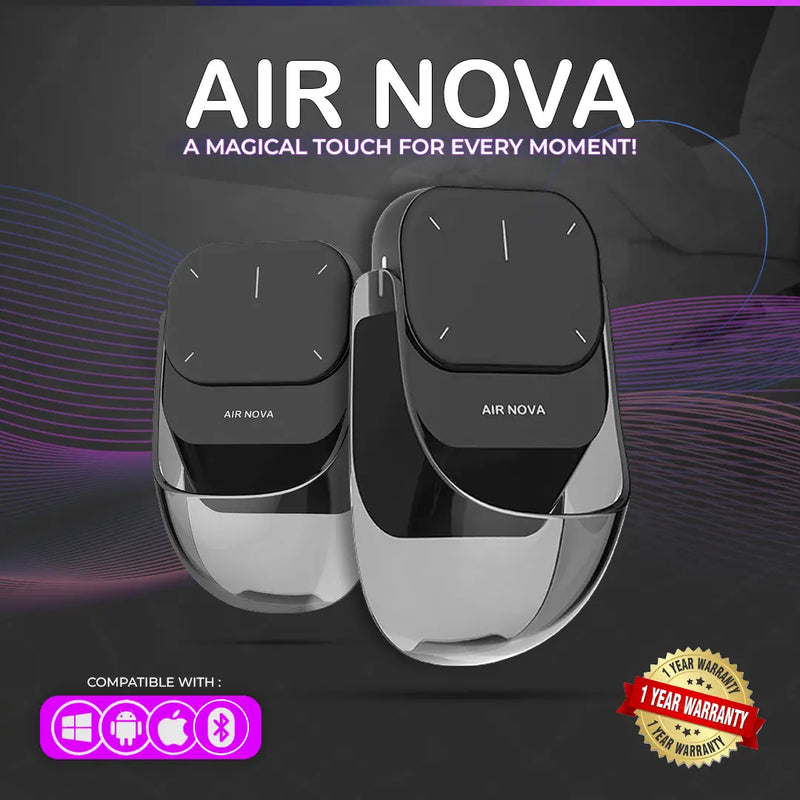
Air Nova — $149 $89
⭐ BEST OVERALL MOUSE FOR IPAD
Best for: iPad users who present in Keynote or Zoom AND use their iPad as a daily work device — teachers, consultants, students, remote professionals.
The Air Nova takes the top spot because it solves two iPad problems with one device. Its detachable dual-mode design works as a full Bluetooth mouse for everyday iPad navigation — then the top section detaches to become a wireless presenter with a built-in laser pointer for Keynote, Google Slides, and PowerPoint presentations.
iPad is increasingly the device people present from — in classrooms, client meetings, and conference rooms. The Air Nova eliminates the need for a separate mouse and a separate clicker. Bluetooth 5.1 pairs directly with any iPad model. No drivers. No dongle. The ergonomic body handles full work sessions. At $89 (down from $149), you're paying the same as Apple's Magic Mouse and getting a device that actually fits your hand plus a built-in wireless presenter. Works with iPadOS, macOS, Windows, Android, and ChromeOS.
Best Ergonomic Mouse for iPad
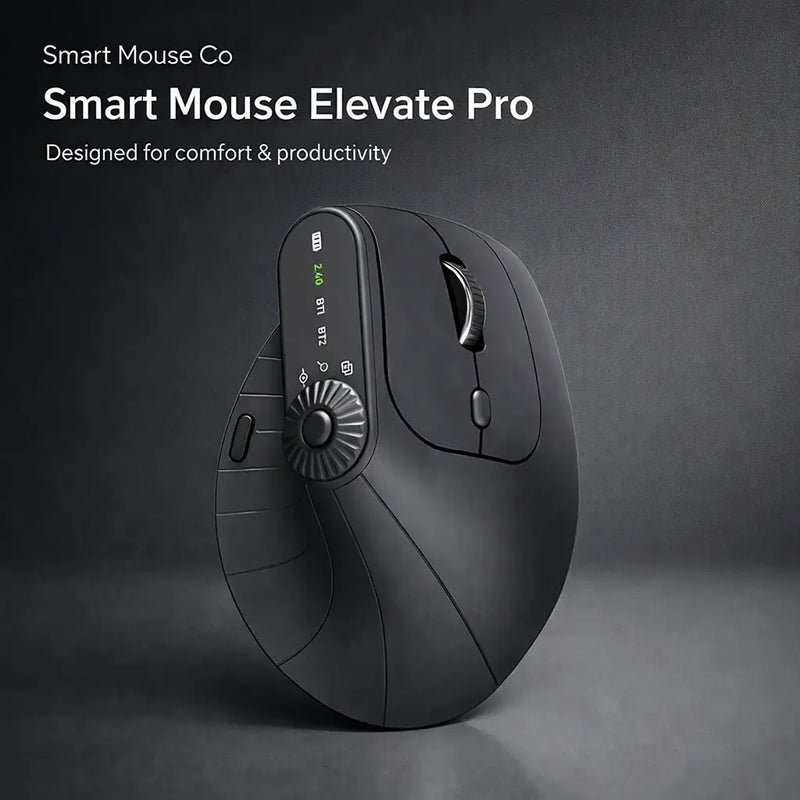
Elevate Pro — $129 $89
⭐ BEST ERGONOMIC
Best for: iPad users who work 4+ hours at a desk and want a vertical ergonomic mouse that keeps their wrist comfortable — especially iPad Pro and Air users with keyboard stands.
If you've set up your iPad with a Magic Keyboard, a keyboard case, or a stand-and-keyboard combo at a desk, you're using it like a laptop. And like a laptop, your wrist needs support during extended sessions. The Elevate Pro is a Bluetooth vertical mouse with a physical adjustment knob that lets you dial in the exact tilt angle that feels best for your hand.
The vertical grip holds your hand in a handshake position — completely different from the flat-palm position of touching the iPad screen. For iPad users who've graduated from "tablet for browsing" to "iPad as primary computer," the Elevate Pro provides the ergonomic infrastructure that turns long work sessions from tiring to sustainable. Bluetooth pairing. Available in White (matches Silver iPads perfectly), Black, and Beige. $89 (down from $129).
Best Gesture Input for iPad
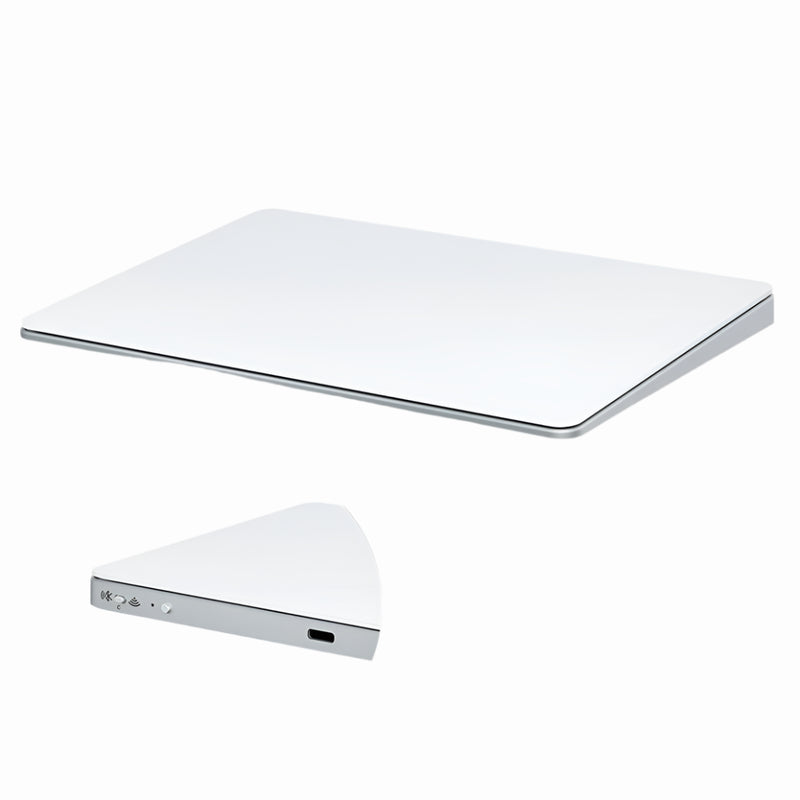
Touch Flow — $136.92 $89
⭐ BEST GESTURE INPUT
Best for: iPad users who love iPadOS gestures and want an external trackpad surface — especially iPad Mini and base iPad users whose keyboard cases don't include a trackpad.
Apple's Magic Keyboard ($299–$349) includes a tiny trackpad. Apple's Magic Trackpad ($129) is a standalone option but expensive and large. The Touch Flow is a Bluetooth wireless trackpad with a smooth glass multi-touch surface that supports iPadOS gestures natively — two-finger scroll, pinch-to-zoom, three-finger app switching — at $89 and in a more portable form factor.
For iPad users who specifically want gesture-based input rather than traditional mouse clicking, the Touch Flow is the answer. And for iPad Mini users or base iPad users whose keyboard accessories don't include a trackpad, the Touch Flow adds gesture navigation that otherwise requires a $299 Magic Keyboard upgrade. Bluetooth pairing with any iPad. Glass surface. $40 cheaper than Apple's Magic Trackpad.
Best Travel Mouse for iPad
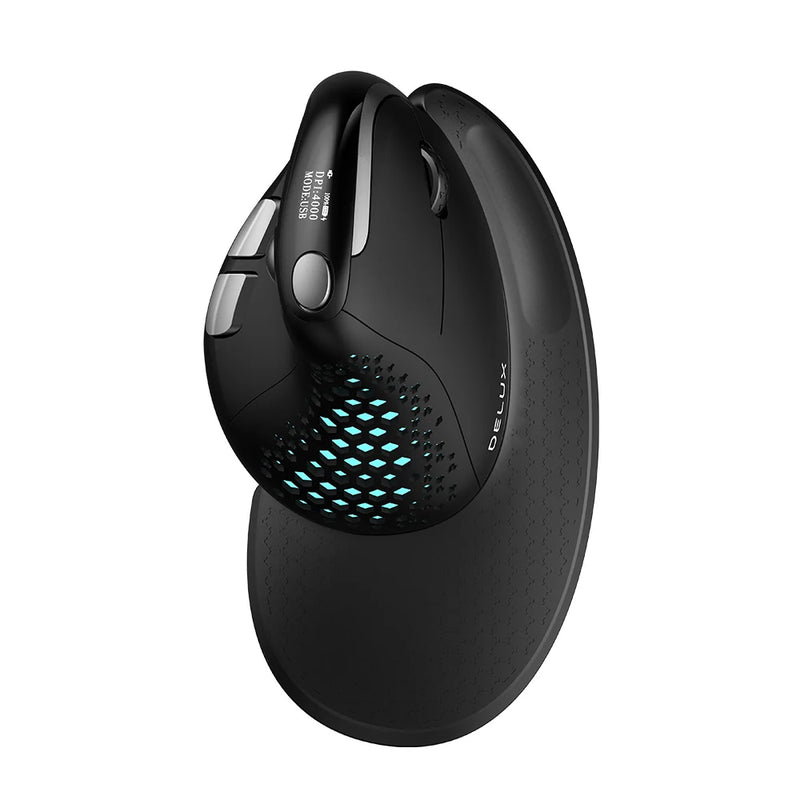
Seeker — $89
⭐ BEST TRAVEL MOUSE
Best for: iPad users who carry their tablet as a mobile workstation — students moving between classes, professionals switching between meeting rooms, travelers working from anywhere.
The iPad's entire value proposition is portability. Your mouse should match it. The Seeker is compact enough to drop into the same bag pocket as your Apple Pencil and charging cable. Bluetooth connects to your iPad in seconds — no dongle needed, no USB port consumed. Tracks reliably on café tables, library desks, airplane trays, and every other surface iPad users encounter.
Unlike ultra-small travel mice that cramp your hand after 20 minutes, the Seeker balances compact size with enough body to support comfortable sessions that last as long as your iPad's battery does. At $89, it's the mouse that makes your mobile iPad setup genuinely complete — keyboard for typing, Apple Pencil for drawing, Seeker for pointing.
Most Portable Mouse for iPad
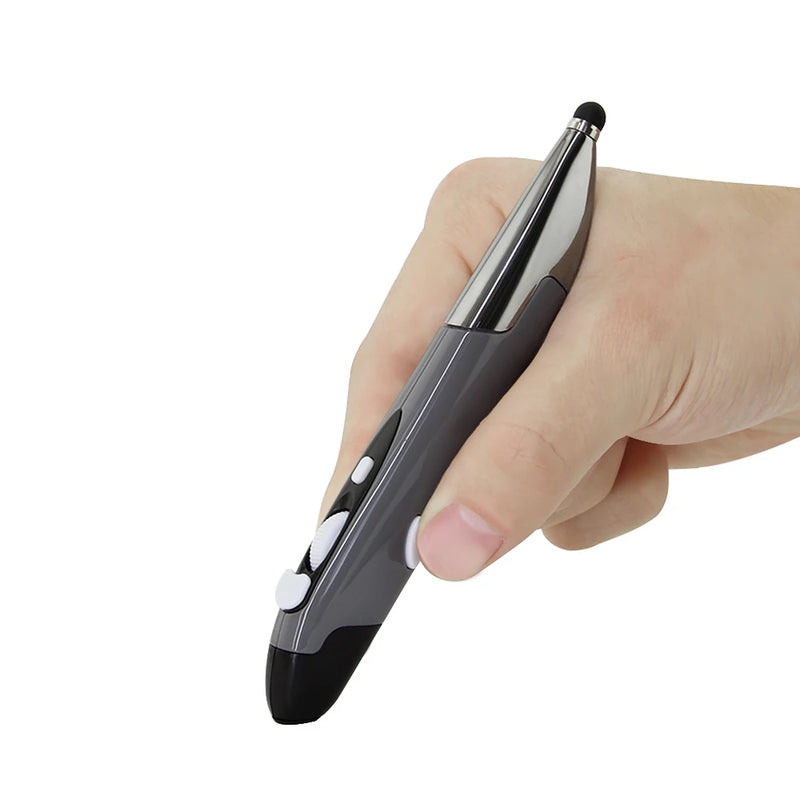
PenX — $37.95
⭐ MOST PORTABLE
Best for: iPad users who want the absolute smallest mouse possible — a pen-shaped device that weighs almost nothing and fits next to your Apple Pencil.
The PenX is shaped like a pen and functions as a full wireless mouse. Click, scroll, and cursor movement — built into a cylindrical body that fits in a pencil case, shirt pocket, or the pen loop on your iPad case. For iPad users who resist adding bulk to their ultra-portable setup, the PenX is the mouse that adds zero perceptible weight.
At $37.95, it's the cheapest mouse in this guide. Available in Gray, Blue, and Red. The pen form factor is especially natural for iPad users who already carry an Apple Pencil — the PenX sits alongside it in your accessory kit and serves a completely different function. Apple Pencil for creative work. PenX for cursor work. Both the size of a pen.
Best Vertical Value Mouse for iPad
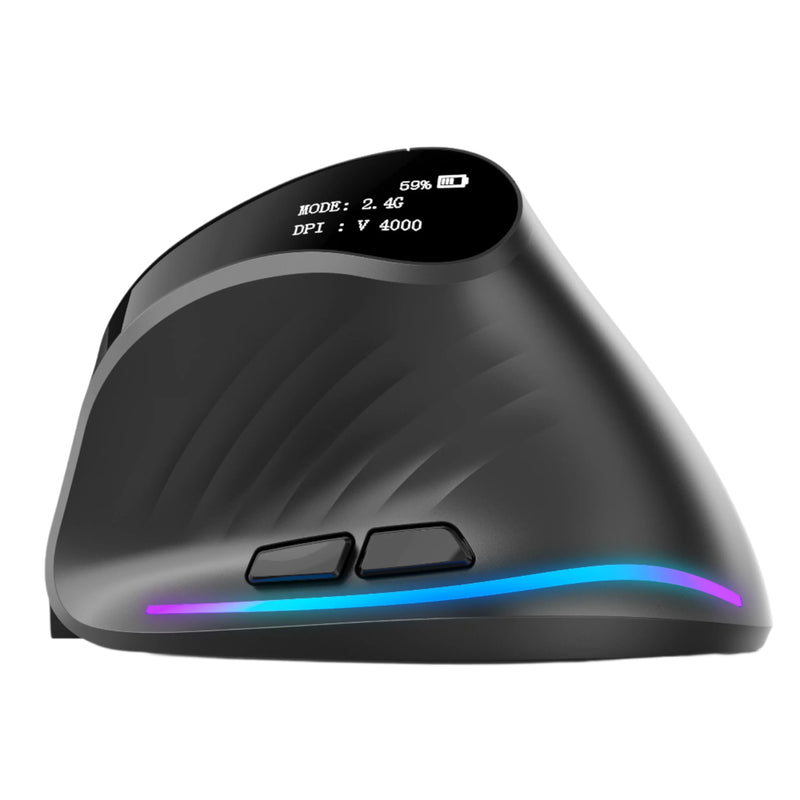
Verta — $59
⭐ BEST VERTICAL VALUE
Best for: iPad desk users who want vertical ergonomic comfort at $30 less than the Elevate Pro.
The Verta delivers the same vertical handshake-grip concept as the Elevate Pro without the adjustable tilt knob — and at $59 instead of $89. For iPad users who've committed to a desk setup with a stand and keyboard and want ergonomic wrist support during long work sessions, the Verta provides that support at a mid-range price.
Wireless connectivity, side buttons for iPadOS browser navigation, and a fixed tilt angle calibrated for most hand sizes. At $59, it undercuts most vertical mice on the market while delivering genuine ergonomic benefit. Bluetooth compatible with every iPad.
Best Mid-Range Mouse for iPad
ErgoGlide — $49.95
⭐ BEST MID-RANGE
Best for: iPad users who want ergonomic comfort between the $34.95 budget tier and the $89 premium tier — students, freelancers, casual iPad workers.
The ErgoGlide sits in the practical sweet spot for iPad users who want more than a generic flat mouse but don't need a full vertical design. Ergonomic contouring supports the palm naturally. Wireless connectivity pairs via Bluetooth. Responsive tracking handles iPadOS cursor movement without skipping or drifting.
At $49.95, it's the Goldilocks option — enough ergonomic quality to be genuinely comfortable, enough portability to travel with your iPad, and a price that makes the decision easy for anyone who has been using the touchscreen as their sole input method.
Best Silent Mouse for iPad
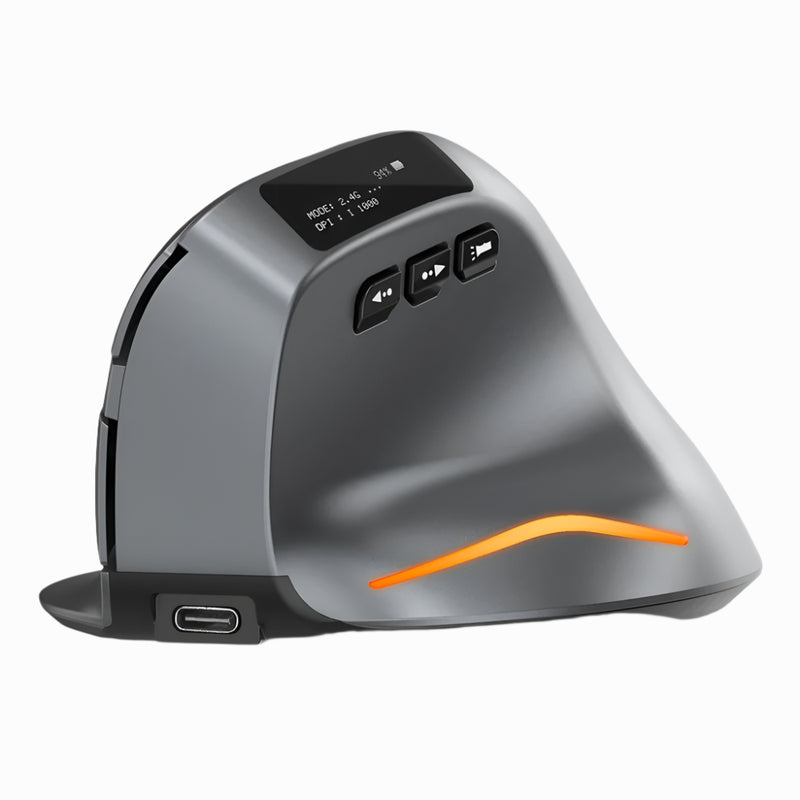
Lumos — $59
⭐ BEST SILENT
Best for: iPad users who work in classrooms, libraries, shared study spaces, or during FaceTime/Zoom calls — anywhere click noise is disruptive.
iPad usage is inherently quiet — no keyboard clatter (on-screen keyboard), no fan noise, silent touchscreen taps. Adding a clicking mouse breaks that silence. The Lumos features silent click switches that maintain the iPad's quiet operating personality. Every press is soft, tactile, and virtually noiseless.
For students using iPads in lecture halls. For teachers navigating lesson plans on an iPad during class. For professionals clicking through documents during a FaceTime call. The Lumos preserves the silence that makes iPad a considerate device in shared spaces. At $59, wireless, Bluetooth, iPad-compatible, and quieter than a touchscreen tap.
Best Trackball Mouse for iPad
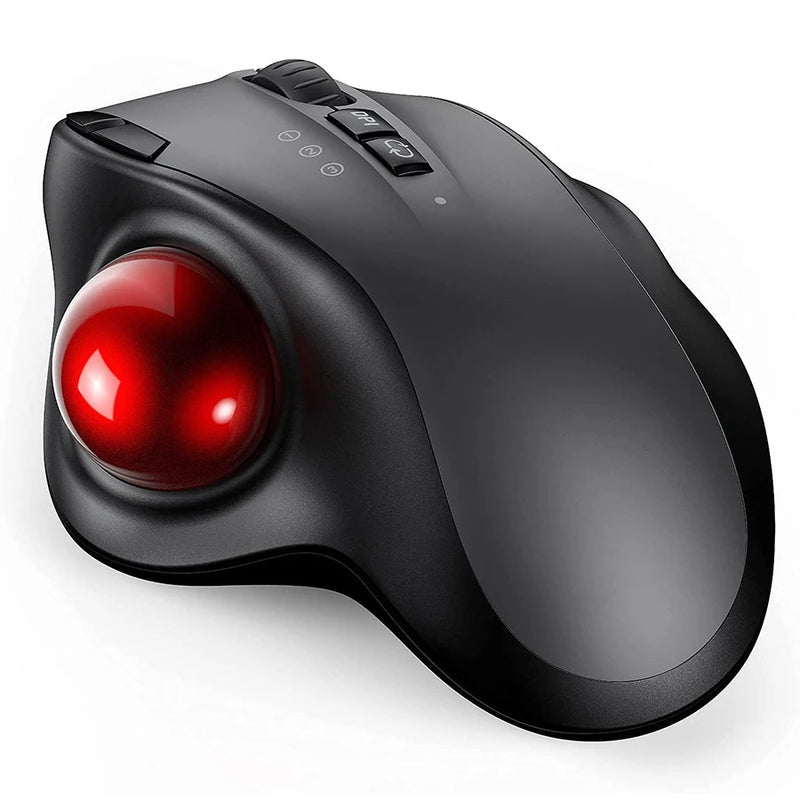
Orbit — $59
⭐ BEST TRACKBALL
Best for: iPad users who work on surfaces with zero mouse movement space — using iPad as a bedside device, on an airplane tray, or on a cramped table with the iPad taking up all the room.
iPads take up surface space. Your keyboard case takes up more. An Apple Pencil sits next to it. By the time you've set up your iPad workstation on a small table, there's no room left to move a mouse. The Orbit solves this — your thumb rolls the ball, the cursor moves, and the mouse body stays completely fixed. Full cursor control in the footprint of a coaster.
iPadOS supports trackball input natively. Bluetooth pairing. At $59, the Orbit turns the tightest iPad workspaces — airplane trays, bedside tables, lecture hall fold-down desks — into fully functional setups with cursor control. Once you adapt (3–5 days), it becomes the natural companion for space-constrained iPad use.
Best Budget Mouse for iPad

ErgoX — $34.95
⭐ BEST BUDGET
Best for: Students and casual iPad users who want to try using a mouse with their iPad for the first time — at the lowest possible price.
Your iPad cost $349 to $1,599. The ErgoX costs $34.95 — 2 to 10% of your iPad's value. That 2–10% buys you a wireless mouse with ergonomic shaping, a scroll wheel, side buttons, and Bluetooth connectivity that pairs with your iPad in 30 seconds. Compare that to the $0 you're spending on pointing input right now — and the hundreds of touches per hour your arm makes reaching up to the screen.
The ErgoX is the zero-risk entry point for iPad mouse use. Try it for a week. If a mouse transforms how you use your iPad (it will), you can upgrade later. If $34.95 is your entire accessory budget, the ErgoX delivers more productivity improvement per dollar than any iPad accessory except a keyboard.
Which Mouse Is Right for Your iPad?
| If you... | Get this |
|---|---|
| Present from your iPad AND do daily work | Air Nova ($89) |
| Work 4+ hours at a desk with your iPad | Elevate Pro ($89) |
| Prefer gestures over clicking | Touch Flow ($89) |
| Carry your iPad everywhere | Seeker ($89) |
| Won't carry anything bigger than a pen | PenX ($37.95) |
| Want vertical design at a lower price | Verta ($59) |
| Want ergonomic comfort under $50 | ErgoGlide ($49.95) |
| Need silent clicks in shared spaces | Lumos ($59) |
| Have zero space to move a mouse | Orbit ($59) |
| Want the cheapest iPad mouse that works | ErgoX ($34.95) |
Frequently Asked Questions
Does iPad support mouse input?
Yes. Every iPad running iPadOS 13.4 or later supports Bluetooth mouse input with full cursor control — left click, right click, scroll wheel, side buttons, and hover effects (on M-series iPads). This includes iPad Pro, iPad Air, iPad Mini, and base iPad models. Any standard Bluetooth mouse pairs through Settings → Bluetooth and works immediately without drivers.
Do I need a special mouse for iPad?
No special mouse is required — any standard Bluetooth HID mouse works. However, mice that require custom driver software (Logitech Options+, Razer Synapse) lose their programmable features on iPadOS since those apps don't exist on iPad. Mice that function well out-of-the-box without software — like every mouse in this guide — deliver their full feature set on iPad without compromise.
Is the Apple Magic Mouse good for iPad?
The Magic Mouse pairs easily and supports gesture scrolling on iPadOS. However, it has no ergonomic shaping, no scroll wheel, charges via a port on the bottom (unusable while charging), and costs $79–$99. For the same price, the Air Nova from Smart Mouse Co offers a shaped ergonomic body, scroll wheel, side buttons, and a built-in presentation remote — significantly more value for iPad users.
Can I use a mouse and the touchscreen at the same time on iPad?
Yes. iPadOS supports simultaneous mouse and touch input. You can navigate with the cursor while using touch gestures or Apple Pencil input on the screen. This is especially useful in creative apps where you want cursor control for UI navigation and Apple Pencil for drawing.
Will a mouse work with iPad Mini?
Yes. iPad Mini (6th generation with A15 and current generation with A17 Pro) supports full Bluetooth mouse input including cursor, right-click, scroll, and side buttons. A mouse is especially valuable on iPad Mini because the smaller screen makes touch targets harder to hit accurately — a cursor solves that precision problem entirely.
What's the cheapest mouse that works with iPad?
The ErgoX at $34.95 is the most affordable wireless mouse in this guide with Bluetooth iPad compatibility. The PenX at $37.95 offers extreme portability in a pen form factor. Both connect via Bluetooth, work with every iPad model, and require no drivers or configuration.
Conclusion — Your iPad Can Be a Computer. It Just Needs a Mouse.
Apple sells the iPad as a creative tool, a productivity device, and — with the M-series chips — a laptop replacement. They built full mouse support into iPadOS. They added Stage Manager for desktop-style multitasking. They enabled external display output with independent cursor control. They did everything to make the iPad work like a computer except ship it with the one accessory that makes computer-style input actually possible.
A Bluetooth mouse costs $34.95 to $89. It pairs in 30 seconds. It works with every iPad Apple currently sells. It makes every task faster, every interaction more precise, and every long session more comfortable. And it ships free, worldwide, from Smart Mouse Co — the brand that does nothing but mice.
100 million active iPads. Almost none with a mouse. Be the one who adds one.
Your iPad Is a Computer. Give It a Mouse.
17 wireless mice. Bluetooth-ready. iPad-compatible. Free shipping worldwide.
- ✓ Works with iPad Pro, Air, Mini & base iPad
- ✓ Ergonomic, vertical, trackball, pen & trackpad designs
- ✓ Bluetooth — pairs in 30 seconds, no drivers needed
- ✓ $34.95–$89 · Free worldwide shipping
Shop All iPad-Compatible Mice →





Leave a comment
This site is protected by hCaptcha and the hCaptcha Privacy Policy and Terms of Service apply.