







Your laptop cost $800 to $3,500. It has the best display you've ever owned. It runs faster than desktops from five years ago. It handles video editing, development environments, design tools, and 47 open Chrome tabs without breaking a sweat.
And you're still navigating all of that with a 4.5-inch trackpad and your index finger. That's like buying a sports car and only driving it in first gear.
Adding a mouse to your laptop setup is the single highest-impact, lowest-cost upgrade you can make. Spreadsheets become navigable. Design tools become precise. Text selection stops being a fight. Right-clicking stops being a two-finger guessing game. Multi-monitor setups become manageable. And your hand — the one that's been cramping from hovering over a flat glass surface for six hours — finally gets a tool shaped for the way humans actually grip things.
But not every mouse works well with a laptop. You need wireless (cables on a laptop desk are absurd). You need Bluetooth or a tiny receiver (your USB ports are limited and precious). You need portability if you ever leave your desk. And you need comfort that lasts longer than a single Zoom call. At Smart Mouse Co, mice are our entire business — and every mouse in our collection is built for exactly these requirements. This guide covers the 10 best, ranked by the way laptop users actually work.
Quick Picks: Best Mouse for Laptop by Use Case
| Mouse | Best For | Price | Highlight |
|---|---|---|---|
| Air Nova | Presentations + daily laptop work |
|
⭐ Best Overall |
| Elevate Pro | Ergonomic vertical for long sessions |
|
⭐ Best Ergonomic |
| Seeker | Compact travel + café work | $89 | ⭐ Best Travel |
| Touch Flow | Trackpad upgrade for gesture lovers |
|
⭐ Best Trackpad Alternative |
| PenX | Ultra-portable pen mouse | $37.95 | ⭐ Most Portable |
| ErgoGlide | Ergonomic comfort under $50 | $49.95 | ⭐ Best Mid-Range |
| Verta | Vertical design + everyday use | $59 | ⭐ Best Vertical Value |
| Lumos | Silent clicks for calls + shared spaces | $59 | ⭐ Best Silent |
| Orbit | Trackball for tiny desks | $59 | ⭐ Best Trackball |
| ErgoX | Cheapest reliable wireless | $34.95 | ⭐ Best Budget |
Browse all 17 Smart Mouse Co mice →
Trackpad vs Mouse for Laptop — Why Every Laptop User Should Add a Mouse
Laptop trackpads are better than they've ever been. Apple's Force Touch trackpad is excellent. Windows Precision trackpads have improved dramatically. But "better than before" is not the same as "good enough for real work." Here's why a mouse outperforms a trackpad for any laptop user who spends more than two hours a day on their computer:
Speed. A mouse moves the cursor faster across large screens and multi-monitor setups. Trackpad users make multiple finger lifts and re-swipes to cross a single monitor. Mouse users cross the same distance in one motion. Over a full workday, the cumulative time saved is measured in minutes — which compounds into hours per month.
Precision. Clicking a specific cell in a spreadsheet, selecting a single word in a paragraph, hitting a 12-pixel button in a web app — all tasks where a mouse with a stable grip outperforms a fingertip sliding on glass. The difference is subtle for casual use and dramatic for precision-dependent work.
Comfort. A trackpad forces your hand into a flat, hovering position with fingers extended. There's no grip, no support, no ergonomic shaping. A mouse — especially an ergonomic or vertical model — supports your palm, positions your fingers naturally, and keeps your wrist in a sustainable position. After four hours on a trackpad, your hand knows the difference.
Right-clicking and scrolling. Two-finger right-click and two-finger scroll work on trackpads, but they're gestures — not dedicated physical inputs. A mouse gives you a dedicated right-click button and a scroll wheel that provides tactile, controlled scrolling instead of velocity-based gesture scrolling. For scroll-intensive work (spreadsheets, code, long documents), a scroll wheel is transformatively faster.
Drag-and-drop. The single worst interaction on a trackpad. Press, hold, and simultaneously slide your finger without losing contact or changing pressure — on a smooth glass surface, while your other fingers try not to interfere. A mouse makes drag-and-drop effortless: click, hold, move.
What Makes a Great Mouse for Laptop Use
Wireless is non-negotiable. A wired mouse on a laptop is cable management chaos. Bluetooth is the cleanest option — no dongle needed, no USB ports consumed. 2.4GHz wireless with a nano receiver works too, but uses one of your limited USB-A or USB-C ports. Dual-mode mice (Bluetooth + 2.4GHz) give maximum flexibility.
Compact size matters — but not at the expense of comfort. Ultra-small travel mice save bag space but cramp your hand after 30 minutes. The best laptop mice balance portability with enough surface area to support a natural grip for hours. Look for mice that feel full-sized in use but pack small.
Battery life must be set-and-forget. A mouse that dies mid-meeting is a workflow killer. Look for weeks or months on a single charge. USB-C rechargeable mice that share a cable with your laptop are ideal — one cable charges everything.
Multi-surface tracking. Laptop users don't always have a mousepad. Your mouse needs to track accurately on wood, plastic, textured hotel desks, café tables, and whatever surface you end up working on today. Modern optical sensors handle most surfaces, but cheap mice with old sensors still skip on reflective or uneven materials.
Side buttons for navigation. Browser back/forward, app switching, and custom shortcuts mapped to thumb buttons save hundreds of micro-interactions per day. Laptop users who rely on trackpad gestures for these actions lose them when switching to a mouse — unless the mouse has side buttons that replicate or improve on those shortcuts.
Why Smart Mouse Co? Because Mice Are All We Do
Search "best mouse for laptop" on Amazon and you'll get 12,000 results — gaming mice with RGB lighting, ergonomic office mice, ultra-cheap wireless mice that break in two months, and $150 premium options that are overkill for daily laptop work. Sorting signal from noise takes 30–45 minutes, and you'll probably still end up with something mediocre.
Smart Mouse Co is a focused alternative. Mice are the entire brand. Every product is curated for wireless connectivity, ergonomic quality, and the way laptop users actually work — on the go, across multiple surfaces, for hours at a time. No filler products. No overpriced gamer mice pretending to be office tools. No generic knockoffs with fake reviews. Just mice selected by people whose entire job is finding the best ones.
Free worldwide shipping on every order. Every mouse is wireless. Every mouse works with Mac, Windows, iPad, Chromebook — the full range of laptops people actually use in 2026.
The 10 Best Mice for Laptop, Ranked by Category
Best Overall Mouse for Laptop
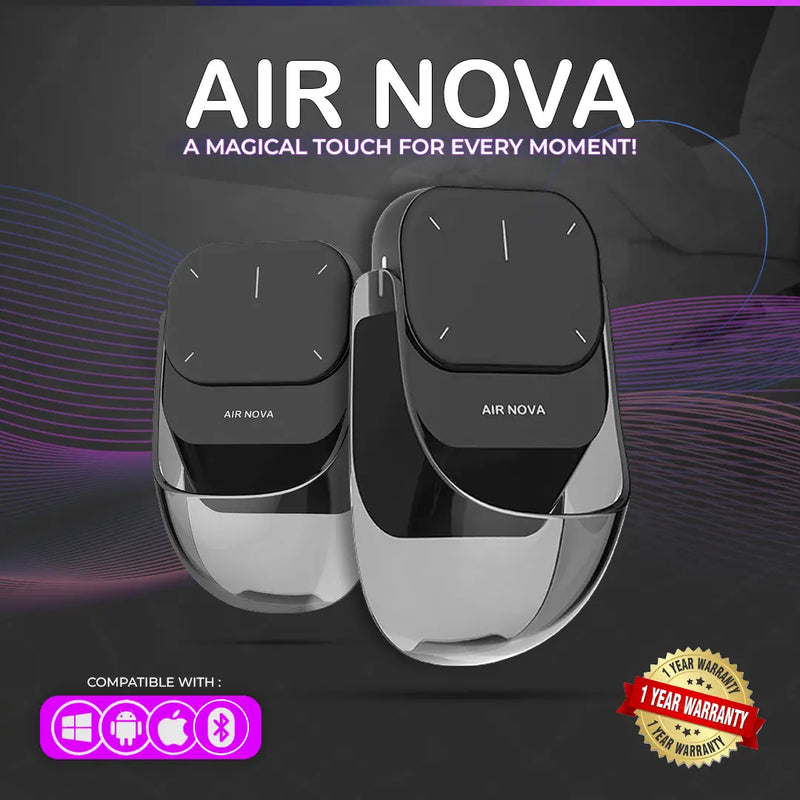
Air Nova — $149 $89
⭐ BEST OVERALL MOUSE FOR LAPTOP
Best for: Laptop professionals who present on Zoom, work in Google Workspace or Office, and want one device that handles daily work AND wireless presenting.
The Air Nova earns the top spot because it solves two laptop problems with one device. Its detachable dual-mode design functions as a full Bluetooth mouse for everyday work — then the top section detaches to become a wireless presenter with a built-in laser pointer for Keynote, PowerPoint, Google Slides, and screen-sharing on Zoom and Meet.
For laptop users, this is transformative. No more switching between a mouse and a separate clicker during meetings. No more packing two wireless devices for a client presentation. Bluetooth 5.1 connects to any laptop — MacBook, ThinkPad, Dell XPS, Surface, Chromebook — without drivers. The ergonomic body handles multi-hour work sessions. At $89 (down from $149), it's a mouse and a presentation remote for less than most people pay for just the mouse.
Best Ergonomic Mouse for Laptop
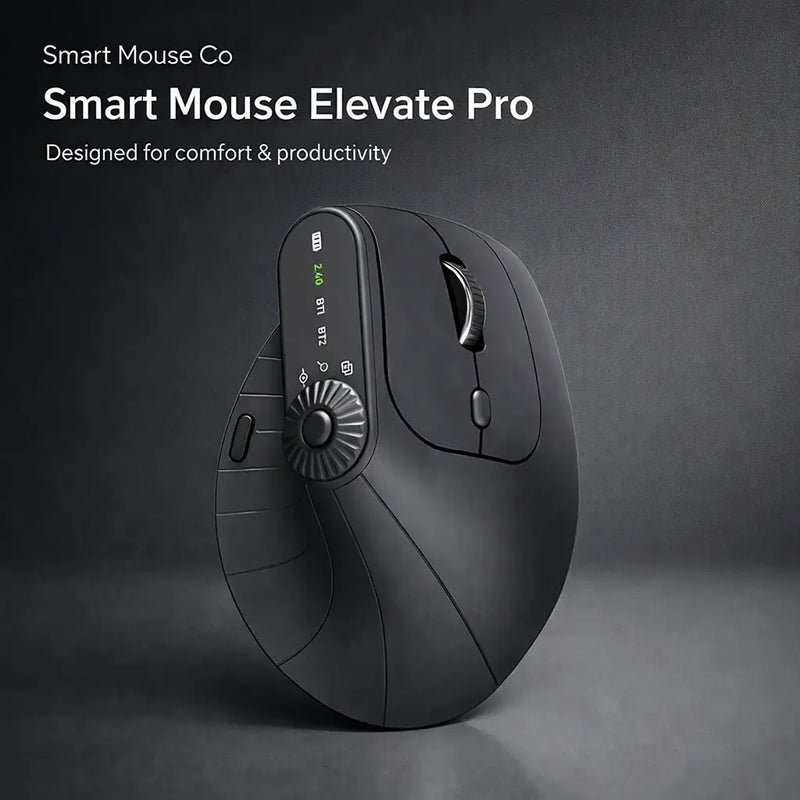
Elevate Pro — $129 $89
⭐ BEST ERGONOMIC
Best for: Laptop users who work 5+ hours daily and want a vertical mouse with adjustable tilt — especially those experiencing hand fatigue from trackpad use.
If you've been using your laptop trackpad for 6 hours a day and your hand aches by evening, the Elevate Pro is the solution. It's a Bluetooth vertical mouse with a physical adjustment knob that lets you dial in your exact preferred wrist angle. The vertical grip holds your hand in a natural handshake position — completely different from the flat, pronated position your trackpad forces.
For laptop users who work at home desks, co-working spaces, or any setup with stable surface space, the Elevate Pro turns your laptop workstation from a trackpad-fatigue machine into a genuinely comfortable workspace. Bluetooth pairing — no dongle consuming your USB ports. Available in White, Black, and Beige. At $89 (down from $129), it's the ergonomic upgrade that changes how your hand feels at the end of every workday.
Best Travel Mouse for Laptop
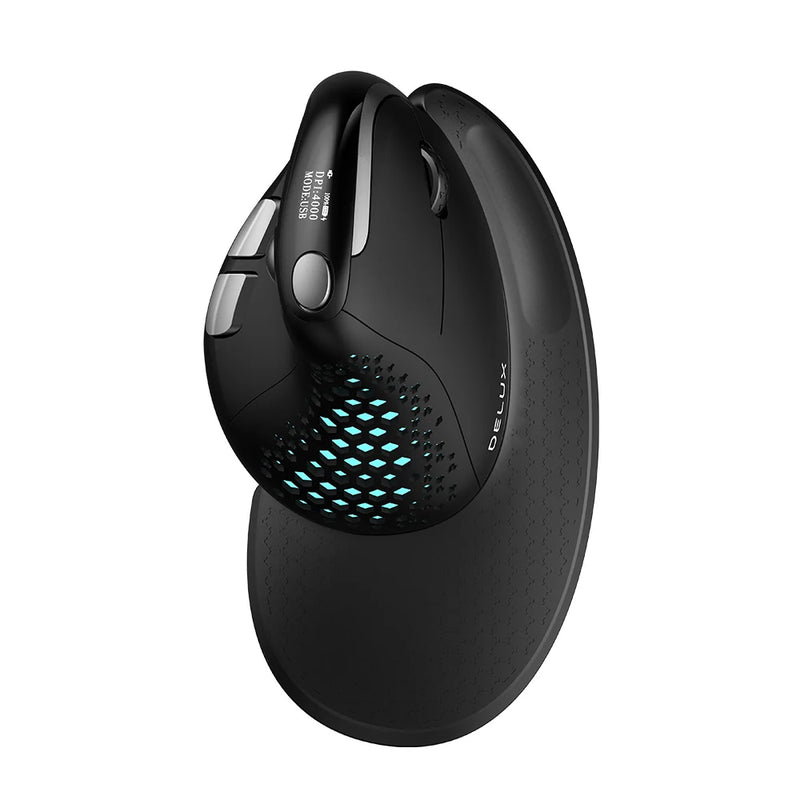
Seeker — $89
⭐ BEST TRAVEL MOUSE
Best for: Laptop users who work from multiple locations — home, office, café, airport — and need a mouse that travels as easily as their laptop.
Your laptop goes everywhere. Your mouse should too. The Seeker is compact enough to fit a laptop bag pocket or tech pouch, connects via Bluetooth without a dongle, and tracks reliably on the unpredictable surfaces laptop users encounter outside their home desk — wooden café tables, glass co-working desks, hotel surfaces that have seen better days.
The balance between portability and comfort is the Seeker's defining trait. It's not so small that your hand cramps after 20 minutes (the problem with ultra-mini travel mice), and not so large that it adds noticeable bulk to your bag. At $89, it's the mouse that pairs with your laptop the way a good case pairs with your phone — always there, always ready, never in the way.
Best Trackpad Alternative for Laptop
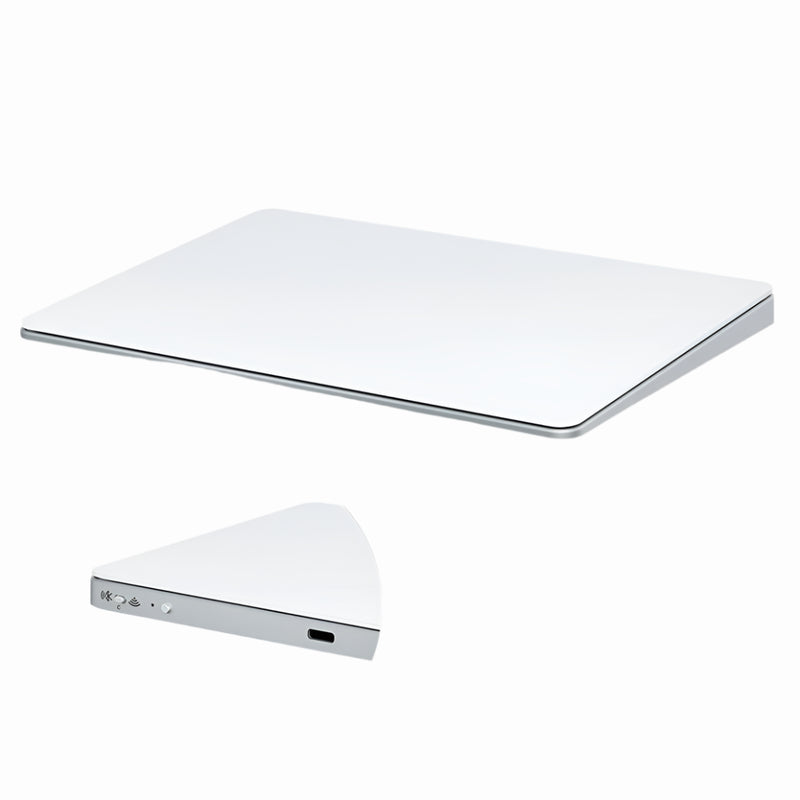
Touch Flow — $136.92 $89
⭐ BEST TRACKPAD ALTERNATIVE
Best for: Laptop users who love gesture input but want a larger, external trackpad — especially MacBook users who prefer gestures over mouse clicking.
Not every laptop user wants a mouse. Some prefer the gesture-based input their trackpad provides — two-finger scroll, pinch-to-zoom, swipe between desktops. The Touch Flow is a Bluetooth wireless trackpad with a smooth glass multi-touch surface that supports all these gestures on a larger, external surface positioned wherever your hand is most comfortable.
For MacBook users, the Touch Flow is the portable alternative to Apple's $129 Magic Trackpad — same gesture support, more portable form factor, $40 less. For Windows laptop users, it adds gesture capabilities that most Windows trackpads can't match. Bluetooth pairing with any laptop. At $89, it bridges the gap between trackpad lovers and mouse users — gesture input with none of the limitations of a built-in laptop trackpad.
Most Portable Mouse for Laptop
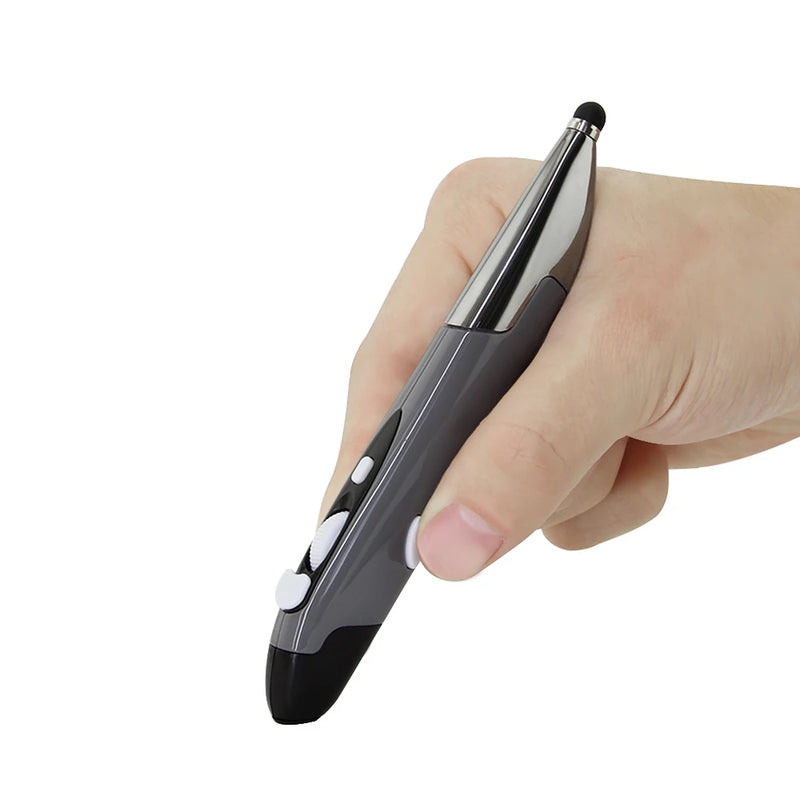
PenX — $37.95
⭐ MOST PORTABLE
Best for: Laptop users who refuse to carry anything that doesn't fit in a pocket — students, commuters, and ultralight travelers.
The PenX is shaped like a pen and functions as a full wireless mouse. Click buttons, scroll control, and cursor movement — all in a cylindrical body that weighs almost nothing and fits in a shirt pocket, pencil case, or the narrowest laptop bag compartment.
At $37.95, it's the cheapest mouse in this guide and the smallest by a wide margin. Available in Gray, Blue, and Red. For laptop users who've avoided adding a mouse because "it's one more thing to carry" — the PenX eliminates that objection entirely. It adds zero perceptible bulk to your laptop kit. No other mouse on the market matches this portability. If your primary objection to using a mouse with your laptop is carrying it, the PenX is the answer.
Best Mid-Range Mouse for Laptop
ErgoGlide — $49.95
⭐ BEST MID-RANGE
Best for: Laptop users who want ergonomic comfort at a reasonable price — the practical sweet spot between budget and premium.
The ErgoGlide delivers genuine ergonomic contouring — a shaped grip that supports your palm and positions your fingers naturally — at a price that doesn't stretch a student or freelancer budget. It's the upgrade for laptop users who know the trackpad isn't enough but aren't ready to invest $89 in a premium model.
Wireless connectivity, responsive tracking on varied surfaces, and a build quality that handles daily laptop bag packing without degrading. At $49.95, the ErgoGlide is the mouse that makes economic sense for anyone who uses a laptop more than two hours a day and has been tolerating the trackpad because they thought a good mouse had to cost $80+. It doesn't.
Best Vertical Mouse for Laptop
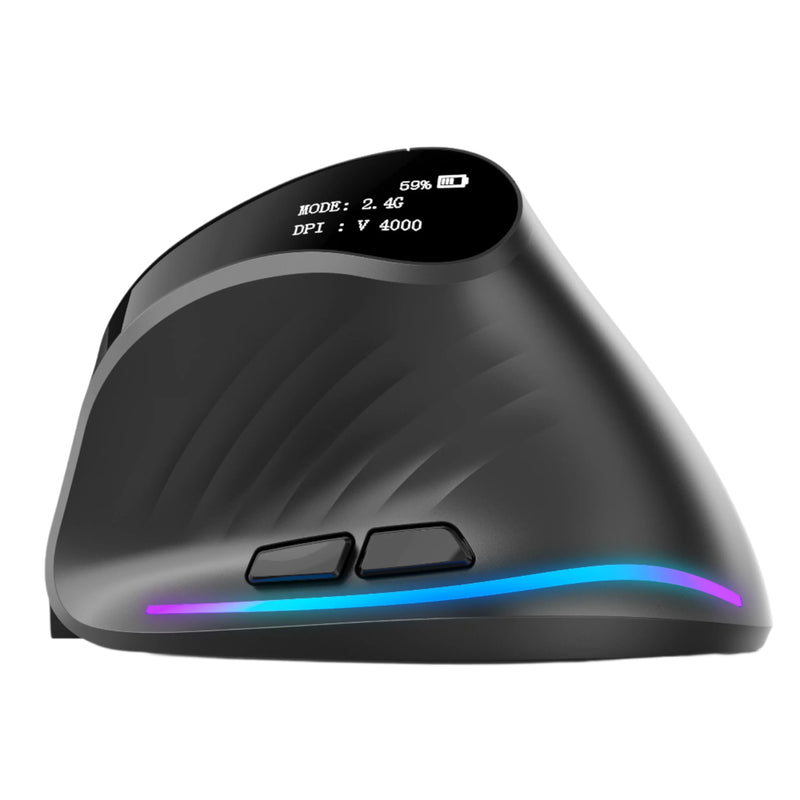
Verta — $59
⭐ BEST VERTICAL VALUE
Best for: Laptop users who want vertical ergonomic comfort at $30 less than the Elevate Pro — strong choice for home office and co-working setups.
The Verta brings the core benefit of vertical mouse design — a handshake grip that keeps your wrist in a neutral position — at a mid-range price. For laptop users who've heard about vertical mice and want to try the concept without a premium investment, the Verta is the entry point that still feels like a serious tool.
It lacks the Elevate Pro's adjustable tilt knob, but the fixed angle works well for most hand sizes. Wireless, with side buttons for browser navigation. At $59, it sits perfectly between the budget ErgoGlide ($49.95) and the premium Elevate Pro ($89) — genuine vertical ergonomics without the premium price tag.
Best Silent Mouse for Laptop
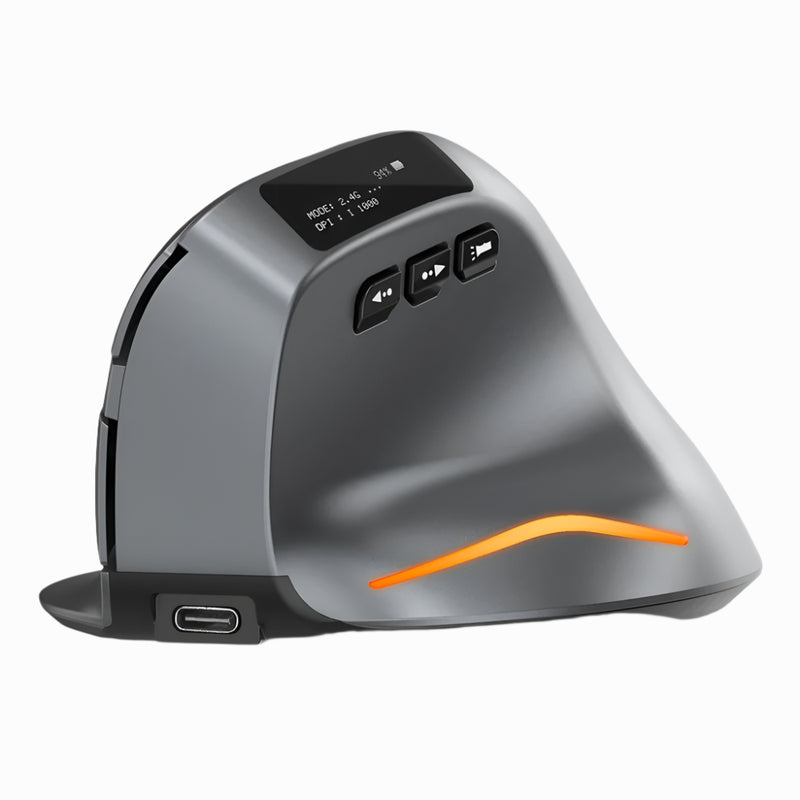
Lumos — $59
⭐ BEST SILENT
Best for: Laptop users who work during Zoom calls, in libraries, in bed next to a sleeping partner, or anywhere click noise is a problem.
Laptop users are constantly on calls. Teams standup at 9am. Client Zoom at 11am. Internal sync at 2pm. Screen-sharing while clicking through slides, scrolling through data, navigating between tabs. And every click bleeds into the laptop microphone. The Lumos features silent click switches — every press is soft and tactile with virtually zero audible noise.
Beyond calls, the Lumos solves the midnight laptop problem. Working from bed while your partner sleeps. Late-night work at a quiet hostel. Early morning sessions in a library before it officially opens. Every scenario where your clicking disturbs someone else. At $59, the Lumos is the mouse for laptop users who are never truly alone when they work.
Best Trackball Mouse for Laptop
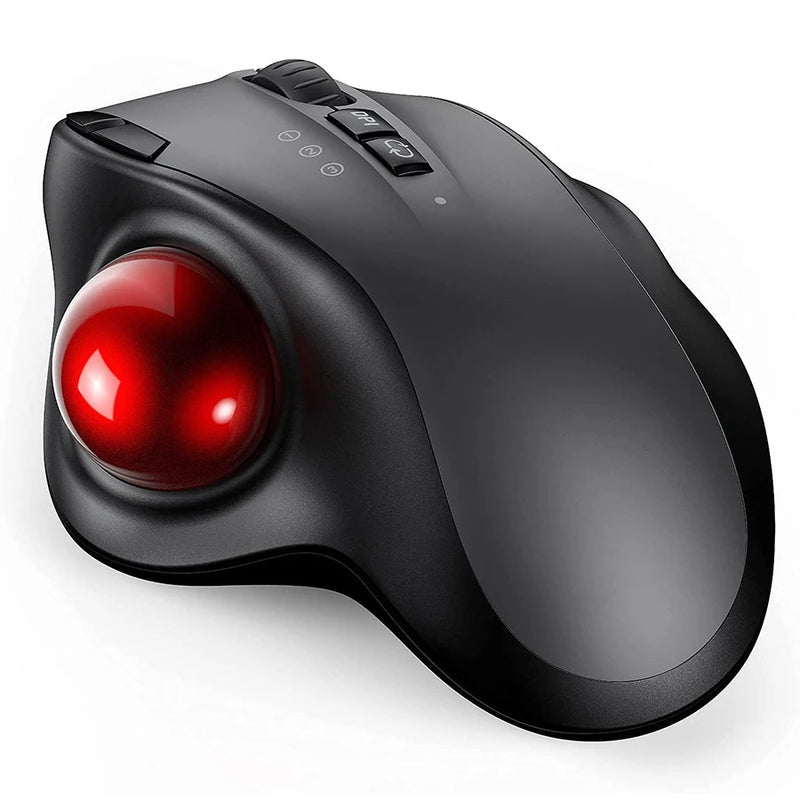
Orbit — $59
⭐ BEST TRACKBALL
Best for: Laptop users who work on surfaces where there's literally no room to move a mouse — airplane trays, tiny café tables, crowded desks.
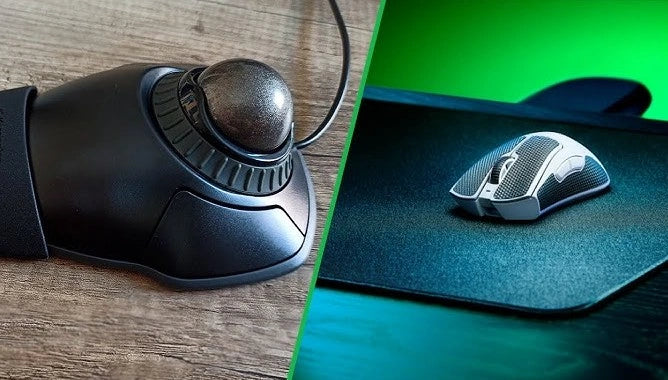
The Orbit is a trackball — your thumb rolls the ball, the cursor moves, and the mouse body stays completely stationary. For laptop users, this solves the #1 space problem: where do you put a mouse when your entire workspace is a 12-inch laptop and 8 inches of table?
Airplane trays. Train fold-down tables. Café counters where your laptop takes up the entire surface. Library desks shared with three other people. The Orbit gives you full cursor control in a fixed footprint — no mouse movement space required. At $59, it's a fundamentally different approach to the laptop mouse problem. Bluetooth compatible. Once you adapt (3–5 days), flying with a laptop becomes a completely different productivity experience.
Best Budget Mouse for Laptop

ErgoX — $34.95
⭐ BEST BUDGET
Best for: Students, interns, and anyone who needs a laptop mouse for under $35 — the cheapest wireless mouse that doesn't feel disposable.
Your laptop probably cost $800+. The ErgoX costs $34.95 — roughly 4% of a base MacBook Air. That 4% buys you a wireless mouse with ergonomic shaping, a scroll wheel, side buttons, and reliable tracking on any surface. Compare that to the $0 trackpad that's limiting your productivity for the other 96% of the investment.
The ErgoX is not the most premium mouse in this guide. It's the one that proves you don't need $89 to dramatically improve your laptop experience. If you're a student whose laptop setup is "laptop on a library desk and nothing else," the ErgoX is the $34.95 addition that changes how everything feels. If you later decide to upgrade, you will. But the ErgoX is never money wasted.
Which Mouse Is Right for Your Laptop?
| If you... | Get this |
|---|---|
| Present on Zoom AND do daily laptop work | Air Nova ($89) |
| Work 5+ hours and your hand aches from the trackpad | Elevate Pro ($89) |
| Take your laptop everywhere | Seeker ($89) |
| Love gestures, hate the trackpad's size | Touch Flow ($89) |
| Refuse to carry one more thing | PenX ($37.95) |
| Want ergonomic comfort under $50 | ErgoGlide ($49.95) |
| Want vertical design at a mid-range price | Verta ($59) |
| Work on calls all day or in quiet spaces | Lumos ($59) |
| Work on airplane trays and tiny surfaces | Orbit ($59) |
| Need the cheapest wireless mouse that works | ErgoX ($34.95) |
Frequently Asked Questions
Do I really need a mouse if my laptop has a good trackpad?
If you use your laptop for more than two hours a day, yes. Even the best trackpad (Apple's Force Touch) is slower for cursor movement, less precise for small targets, worse for drag-and-drop, and less comfortable for extended use than a wireless mouse. A trackpad is fine for quick tasks. For sustained work, a mouse is faster, more precise, and more comfortable.
Should I get a Bluetooth mouse or one with a USB receiver?
Bluetooth is typically better for laptop users because it doesn't consume a USB port and doesn't require carrying a tiny dongle that's easy to lose. A 2.4GHz USB receiver offers slightly more stable connectivity but takes up a port. If your laptop has limited USB ports (especially modern MacBooks with only USB-C), Bluetooth is the cleaner choice.
Will a wireless mouse work with my Chromebook?
Yes. ChromeOS supports Bluetooth mice and USB wireless mice natively. Every mouse in this guide is compatible with Chromebooks, MacBooks, Windows laptops, and iPads. No drivers or special software needed.
Is a vertical mouse practical for laptop use?
Yes — if you have desk space for it. Vertical mice are taller than traditional mice, so they need a stable surface. For laptop users who work at home desks, co-working spaces, or any setup with a proper table, a vertical mouse adds significant ergonomic benefit. For users who work on airplane trays or extremely tight surfaces, a compact traditional mouse or a trackball may be more practical.
What's the best laptop mouse for under $40?
The ErgoX at $34.95 for a traditional wireless mouse with ergonomic shaping. The PenX at $37.95 for extreme portability in a pen form factor. Both are wireless, both work with any laptop, and both cost less than a month of most streaming subscriptions.
Can I use a laptop mouse for gaming too?
Yes. Every wireless mouse in this guide handles casual gaming — indie games, strategy, RPGs, MMOs. For competitive FPS gaming, you may want a dedicated gaming mouse with a higher polling rate. For everything else, a good wireless mouse doubles as a capable gaming mouse without compromise.
Conclusion — Your Laptop Is Ready. Your Input Isn't.
Your laptop is the most powerful computer you've ever owned. It has more processing power, more screen resolution, and more software capability than desktop machines from just a few years ago. And you're controlling all of it by dragging your finger across a 4.5-inch glass rectangle. That was an acceptable trade-off when laptops were secondary devices. In 2026, when your laptop IS your primary computer, the trackpad is the weakest link in your entire workflow.
A wireless mouse costs $34.95 to $89. It connects in seconds. It works on any laptop. It makes every task faster, more precise, and more comfortable. And it ships free, worldwide, from Smart Mouse Co — the brand that does nothing but mice.
Stop navigating a $2,000 machine with your fingertip. Your laptop deserves better input. So does your hand.
Your Laptop Setup Is Missing One Thing
17 wireless mice built for the way laptop users actually work — by the only brand that does nothing but mice.
- ✓ Bluetooth & wireless — no cables, no clutter
- ✓ Ergonomic, vertical, trackball, pen & trackpad options
- ✓ Works with Mac, Windows, Chromebook & iPad
- ✓ $34.95–$89 · Free worldwide shipping
Shop All Laptop Mice →





Leave a comment
This site is protected by hCaptcha and the hCaptcha Privacy Policy and Terms of Service apply.