



You're on a Zoom call. You're screen-sharing a quarterly report. You click through the slides. And your colleague DMs you: "Your mouse clicking is really loud." You mute yourself, finish the slide, unmute to talk. Click through the next section. Forget to mute.
Click-click-click bleeds into the call for 30 seconds. Another DM: "You're not muted." This happens every day, across every open-plan office, every home office with an open mic, every shared workspace where humans sit within 3 meters of each other. Your mouse is part of your audio presence. And most mice sound like tiny hammers.
A standard mouse click registers at 45–55 decibels — roughly the volume of a normal conversation. In a quiet office, that's the loudest repetitive sound in the room. In a home office during a video call, it's louder than your voice to the microphone because the mouse is physically closer to the mic than your mouth is. In a library, it's the sound that gets you glared at. In a recording studio, it's the artifact that ruins a take. The Lumos from Smart Mouse Co reduces click noise to approximately 20–25 decibels — quieter than a whisper. Same tactile feedback. Same click precision. Zero audible noise.
At Smart Mouse Co, mice are our entire business. The Lumos is our purpose-built silent mouse — not a regular mouse with dampened switches as an afterthought, but a mouse designed from the ground up for environments where sound matters. This article covers every scenario where a silent click mouse makes a measurable difference, compares the Lumos against the most popular silent mice on the market, and explains why $59 solves a problem you didn't realize was costing you professionalism, focus, and sanity.
The Sound Problem — What Your Mouse Actually Sounds Like to Other People
Here's what most people don't realize: you've adapted to your own mouse clicks. You don't hear them anymore. They're background noise your brain filters out — like a ticking clock you've lived with for years. But everyone else still hears them.
On video calls
Your laptop microphone sits 30–50cm from your mouse. Your mouth sits 50–70cm from the microphone. Physics means your mouse clicks arrive at the microphone at roughly the same volume as your speaking voice — sometimes louder, because clicks are sharp, percussive sounds that microphones capture with high sensitivity. When you're clicking through a shared document during a Zoom call, every participant hears click-click-click-click as clearly as they hear you talking. Muting between statements helps. Forgetting to mute doesn't.
In open-plan offices
The average open-plan office has an ambient noise level of 45–50 dB. A standard mouse click at 50–55 dB cuts above that ambient level with every press. In a row of 6 desks, the person sitting 2 meters from you can hear every single click you make. Multiply that by 1,700+ daily clicks and your mouse becomes the most repetitive sound source at your desk — more than your keyboard, more than your voice, more than anything else you produce in a work session.
In home offices with shared spaces
Working from the kitchen table while your partner takes a call in the next room. Working from the bedroom while someone sleeps. Working from the living room while someone watches TV. In every scenario, your mouse clicks add noise to a space where someone else is trying to focus, sleep, or exist peacefully. It's the small friction you both tolerate without discussing — because who complains about mouse clicking? Everyone notices it. Nobody says it.
In recording and creative environments
Music studios, podcast setups, voiceover booths, video editing suites — environments where microphones are always present and always sensitive. A single audible mouse click during a vocal recording forces a re-take. During a podcast recording, clicks bleed into the track as a persistent, distracting artifact. In these environments, a silent mouse isn't a preference. It's a production requirement.
What Makes a Mouse Click Silent — The Engineering Behind the Lumos
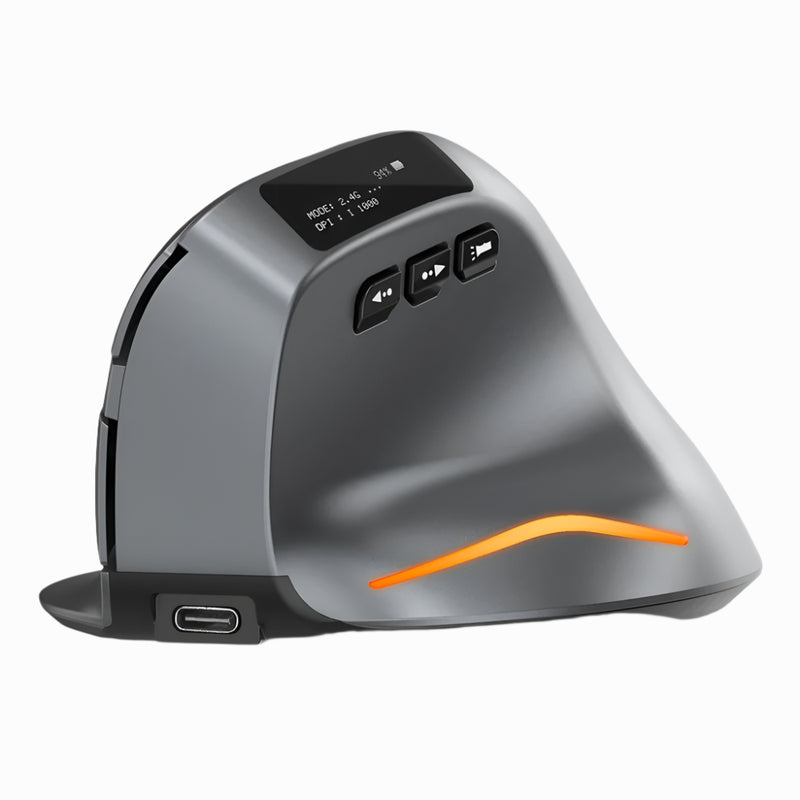
A standard mouse click has two sound-producing components: the mechanical snap of the switch contact (a metal leaf striking a base plate) and the plastic shell resonating with that snap (the hollow body amplifies the click sound like a tiny drum). Both combine to produce the sharp, audible "click" that's been the default mouse sound since the 1980s.
The Lumos uses dampened silent switches that address both components:
Soft contact mechanism. Instead of a metal leaf snapping against a hard base, silent switches use a dampening layer that cushions the contact point. The electrical signal registers at the same actuation point — the click is still precise, still reliable, still tactile. But the mechanical impact that produces the sharp sound is absorbed by the dampening material. The result: you feel the click, but you don't hear it.
Reduced shell resonance. The Lumos body is engineered to minimize acoustic amplification. Standard hollow mouse shells act like resonance chambers that amplify switch noise. The Lumos uses material density and internal geometry to dampen that resonance instead of amplifying it.
What's preserved: Tactile feedback. Click precision. Actuation force. Switch durability. Response time. Everything that makes a click functional is identical to a standard switch. The only thing removed is the sound.
What's eliminated: Approximately 25–30 decibels of click noise. A standard click at 50 dB becomes a Lumos click at approximately 20–25 dB — below the threshold of a quiet whisper and well below the noise floor of any office, home, or studio environment.
The Lumos: Everything the $59 Gets You
Lumos — $59
Feature by feature:
Silent click switches on every button. Left click, right click — both use dampened silent switches. Not just the primary click. Both buttons. Every click you make during a workday produces virtually zero audible noise.
Quiet scroll wheel. Standard scroll wheels produce a rhythmic click-click-click as the notched mechanism rotates. The Lumos scroll is engineered for low-noise rotation — smooth, controlled scrolling without the scroll-wheel clicking that standard mice broadcast with every turn.
Ergonomic contoured body. The Lumos isn't just a silent switch in a generic shell. The body is ergonomically contoured to support your palm through full-day use. This is where the Lumos separates from its most direct competitor, the Logitech M330 Silent Plus — which has silent switches in a cheap, flat, $20-feeling body.
Wireless Bluetooth connectivity. Connects to any device via Bluetooth — Mac, Windows, iPad, Chromebook. No dongle. No USB port consumed. No cable. Clean desk. Instant pairing.
Side buttons. Two thumb-accessible buttons for browser back/forward navigation. Standard silent mice in the sub-$30 range typically omit side buttons. The Lumos includes them because office work involves hundreds of browser navigations daily, and side buttons save a micro-interaction on each one.
Multi-surface tracking. Optical sensor tracks on office desks (laminate, wood, glass with limits), home surfaces, co-working tables, and conference room surfaces without requiring a mousepad.
The Lumos vs Logitech M330 Silent Plus — The Only Comparison That Matters
The Logitech M330 Silent Plus gets 6,600 monthly searches and is the most popular silent mouse on the market. It's the mouse most people find first when they search "silent mouse." Here's how it compares to the Lumos:
| Feature | Lumos ($59) | Logitech M330 Silent Plus ($24.99) |
|---|---|---|
| Silent clicks | ✅ Both buttons | ✅ Both buttons |
| Quiet scroll | ✅ Low-noise mechanism | ⚠️ Standard notched (audible) |
| Ergonomic shaping | ✅ Contoured palm support | ❌ Basic rounded shape, minimal support |
| Side buttons | ✅ 2 thumb buttons | ❌ None |
| Connectivity | ✅ Bluetooth (no dongle) | ❌ USB-A dongle only |
| MacBook compatible without adapter | ✅ Yes (Bluetooth) | ❌ No (USB-A dongle needs adapter) |
| Build feel | Mid-range quality | Budget plastic |
| Desk aesthetic | Clean, modern | Generic office supply |
| Price | $59 | $24.99 |
The M330's advantage: It's $34 cheaper. That's the only column where Logitech wins.
The Lumos advantage — everything else: Bluetooth connectivity (the M330's USB-A dongle doesn't work on modern MacBooks without an adapter). Side buttons (the M330 has none). Ergonomic contouring (the M330 feels like a $20 mouse because it is one with a $5 premium for silent switches). Quiet scroll wheel (the M330's scroll is notched and audible — defeating the purpose of a "silent" mouse). And a build quality that looks professional on your desk instead of like something from a hotel business center.
The honest take: The M330 Silent Plus is a perfectly functional silent mouse for $24.99. If your only requirement is "silent clicks at the absolute cheapest price," it works. But if you want silent clicks PLUS ergonomic comfort, side buttons, Bluetooth, and a mouse that looks like it belongs on a modern desk — the Lumos at $59 is $34 more for a meaningfully better daily experience across every dimension except price.
Every Office Scenario Where Silent Clicks Matter
Scenario 1: The Open-Plan Office — Your Desk Is 2 Meters from Someone Else's
Open-plan offices are designed for collaboration. They're terrible for concentration. Every sound travels — conversations, phone calls, keyboard typing, and mouse clicking. Of these, mouse clicking is the most insidious because it's the most repetitive and the least likely to stop. You click 1,700+ times per day. Your neighbor hears every one. A silent mouse eliminates 100% of that noise contribution.
The before: Click-click-click-click from 9am to 5pm. Your neighbor puts on noise-cancelling headphones. You don't realize your mouse is why.
The after with Lumos: Silence. Your neighbor doesn't know you're clicking. Your desk contributes zero repetitive noise to the shared environment. The headphones come off.
Scenario 2: The Zoom Call — Your Microphone Hears Everything
Do this test right now. Start a Zoom call or Voice Memo recording. Click your mouse three times. Play it back. You'll hear three sharp, percussive sounds that are clearly louder than the ambient room noise. Now imagine that playing in someone's earbuds during a 45-minute presentation while you click through 150 slides and documents.
The before: Every screen-sharing session includes audible click-click-click. Colleagues DM you "you're not muted." You develop a habit of constant mute/unmute that breaks your presentation flow.
The after with Lumos: Click through your entire presentation without muting. Nobody hears it. Your microphone captures your voice, not your input device. You present with confidence instead of anxiety about your mute button.
Scenario 3: The Home Office — Your Partner Is in the Next Room
Remote work means your office is inside someone else's home. Your partner is on their own call. Your kid is napping. Your roommate is studying. And you're click-click-clicking through your workday in a space where every sound reaches someone who didn't choose to hear it.
The before: Unspoken tension about your clicking. Your partner closes the door. You feel guilty for being loud doing something as mundane as working.
The after with Lumos: Your mouse produces no more noise than breathing. The door stays open. Nobody is disturbed. You work without self-consciousness about your input sounds.
Scenario 4: The Recording Studio / Podcast Setup
Condenser microphones — the type used in most studio and podcast setups — capture everything within a 2-meter radius at high sensitivity. A mouse click at 50cm from a condenser mic registers as a clear, sharp artifact in the recording. During a podcast recording, that's an edit point. During a music take, that's a re-take. During a voiceover session, that's lost time and lost money.
The before: You stop your mouse activity during recording. Or you edit out clicks in post. Or you re-take because a click bled into the track.
The after with Lumos: Click freely during recording. The silent switches produce sound below the noise floor of even a well-treated room. No re-takes. No editing. No workflow interruption.
Scenario 5: The Library / Co-Working Quiet Zone
Quiet zones exist because people need silence to concentrate. A clicking mouse in a quiet zone is the audio equivalent of eating chips — technically allowed, universally annoying, and the person doing it never seems to notice.
The before: Glares. Passive-aggressive sighs. The acute awareness that your mouse is the loudest thing in a room designed for silence.
The after with Lumos: You're the quietest desk in the room. Your presence adds zero noise. You study or work at full speed without the social cost of audible clicking.
Scenario 6: Late Night at Home — Someone Is Sleeping
The 11pm email. The 1am deadline. The early morning start before anyone else wakes up. Your mouse clicks echo in a sleeping household. Standard mice are audible through a closed bedroom door. You either switch to the trackpad (slower, less precise, more fatiguing) or you click and hope nobody wakes up.
The after with Lumos: Work at full speed at any hour. Nobody wakes up. Nobody knows you're working. The mouse is silent and so is your contribution to the household noise floor.
When Silent Clicks Aren't Enough — The Full Collection
The Lumos is the dedicated silent mouse in Smart Mouse Co's collection. But if your needs extend beyond silence, here are the collection products that complement or upgrade the Lumos:
| If you also need... | Consider... | Price |
|---|---|---|
| Vertical wrist support + silence | Lumos ($59) + Elevate Pro ($89) — use Lumos for calls, Elevate Pro for deep work | $148 total |
| Silent mouse + presentation remote | Lumos + Air Nova ($89) — Lumos for desk, Air Nova for presenting | $148 total |
| Zero mouse movement space + silence | Orbit ($59) — trackball with lower click noise (not silent-switch level) | $59 |
| The cheapest wireless mouse (non-silent) | ErgoX ($34.95) — standard clicks, ergonomic, Bluetooth | $34.95 |
| Gesture trackpad (zero clicking entirely) | Touch Flow ($89) — glass trackpad, tap instead of click | $89 |
Why Buy From Smart Mouse Co
The Logitech M330 Silent Plus is available everywhere — Amazon, Best Buy, Walmart, Target. It costs $24.99. It's fine. It's also a $20 mouse with a $5 silent-switch premium that looks and feels exactly like what it is: the cheapest possible silent option from a brand that makes 200 other products.
The Lumos costs $59 and exists because Smart Mouse Co believes a silent mouse should be a good mouse that happens to be silent — not a cheap mouse with one upgraded component. Ergonomic shaping. Bluetooth connectivity. Side buttons. Build quality that reflects daily professional use. A design that looks intentional on a modern desk.
Free worldwide shipping. Direct support: contact@smartmouseco.com / +1 240-202-9397. Physical address: 200 E Pratt St, Baltimore, MD 21202. When the mouse you use 1,700+ times per day is also the quietest thing in your workspace, it should come from a brand that stands behind every click — even the ones nobody can hear.
Frequently Asked Questions
Are silent mice really silent?
Not perfectly silent — "silent" in mouse terminology means dramatically reduced click noise, not zero sound. The Lumos reduces click noise from approximately 50 dB (standard mouse) to approximately 20–25 dB (below a whisper). In any normal environment — office, home, library, studio — the clicks are functionally inaudible to anyone more than arm's length away, and undetectable by microphones at normal laptop distance.
Do silent switches feel different from regular switches?
Slightly. Silent switches have a softer bottom-out feel because the dampening layer cushions the end of the keystroke. The tactile bump — the point where you feel the click register — is preserved. Most users adapt within minutes and stop noticing the difference within a day. Many users prefer the softer feel once they've experienced it.
Is the Logitech M330 Silent Plus good enough?
For basic silent clicking at the lowest possible price ($24.99), yes. It works. The M330 falls short on ergonomic shaping (basic rounded body, no palm support), connectivity (USB-A dongle only, no Bluetooth), features (no side buttons), and build quality (budget plastic). If silent clicks are your ONLY requirement and price is the primary constraint, the M330 does the job. If you want silent clicks AND a comfortable, well-built, Bluetooth-connected mouse with side buttons, the Lumos at $59 delivers significantly more.
Will a silent mouse help with Zoom call audio?
Yes — this is one of the highest-impact use cases. Laptop microphones capture mouse clicks at nearly the same volume as speech. A silent mouse reduces that click noise by 25–30 dB, making clicks functionally undetectable on calls. You can click through documents and slides during screen-sharing without muting, without disturbing participants, and without the constant mute/unmute dance that breaks presentation flow.
Is $59 too much for a silent mouse when Logitech is $25?
The Logitech M330 is $25 for silent clicks in a basic body with a USB dongle and no side buttons. The Lumos is $59 for silent clicks in an ergonomic body with Bluetooth and side buttons. The $34 difference buys you better connectivity (Bluetooth vs dongle), better comfort (ergonomic vs flat), more functionality (side buttons vs none), and better build quality (professional vs budget). Over 2–3 years of daily use, the per-day cost difference between $25 and $59 is less than 4 cents. The experience difference is immediate and constant.
Do I need a silent mouse if I work alone?
If you're on video calls — yes, because your microphone hears your mouse even if nobody else is in the room. If you never take calls, share a space, or record audio — no, a silent mouse is a preference rather than a need. Most people who work from home are on 2–4 video calls daily, which means most remote workers benefit from silent clicks whether they realize it or not.
Can I use the Lumos for gaming?
Yes — for casual and everyday gaming. The silent switches don't affect click response time or accuracy. For late-night gaming sessions where someone else is sleeping, the Lumos is especially valuable. For competitive FPS gaming where audible click feedback helps with timing, some players prefer the auditory confirmation of standard switches. For everything else, silent works perfectly.
Conclusion — The Quietest Upgrade You'll Never Hear
Your mouse clicks 1,700+ times per day. Each click at 50 dB. Every click heard by your microphone, your coworker, your partner, your roommate, your sleeping child, your recording equipment. You've adapted to the noise. They haven't.
The Lumos reduces that 50 dB to approximately 20 dB — below a whisper. The clicks still register. The tactile feedback is preserved. The precision is identical. The only thing that changes is the sound. And the sound is the part that was bothering everyone else in your life.
$59. Free worldwide shipping. The mouse that fixes a problem you didn't know you were causing — because the problem was never yours. It was theirs. And now it's solved.
1,700 Clicks a Day. Zero Decibels of Guilt.
The Lumos — silent click switches, ergonomic body, Bluetooth wireless. The mouse everyone around you wishes you already had.
- ✓ Silent clicks on every button — ~20 dB vs standard 50 dB
- ✓ Ergonomic contoured body — not a cheap flat shell
- ✓ Bluetooth — no dongle, works with Mac/Windows/iPad/Chromebook
- ✓ Side buttons for browser navigation
- ✓ $59 · Free worldwide shipping
Get the Lumos — $59 →
Want to see the full collection? Browse all 17 Smart Mouse Co mice →



Leave a comment
This site is protected by hCaptcha and the hCaptcha Privacy Policy and Terms of Service apply.