






Your laptop cost $800 to $2,000. Your textbooks cost $150 to $400 this semester. Your meal plan costs $2,000+ per year. Your campus coffee habit costs $5 a day, $150 a month, $1,200 a year. And the tool you use to navigate every essay, every research paper, every spreadsheet, every PowerPoint, every 47-tab Chrome nightmare, and every midnight deadline?
A 4-inch glass rectangle built into the bottom of your keyboard. You're controlling a $1,000+ computer with your index finger on a surface smaller than your phone screen. And it's costing you more than you think.

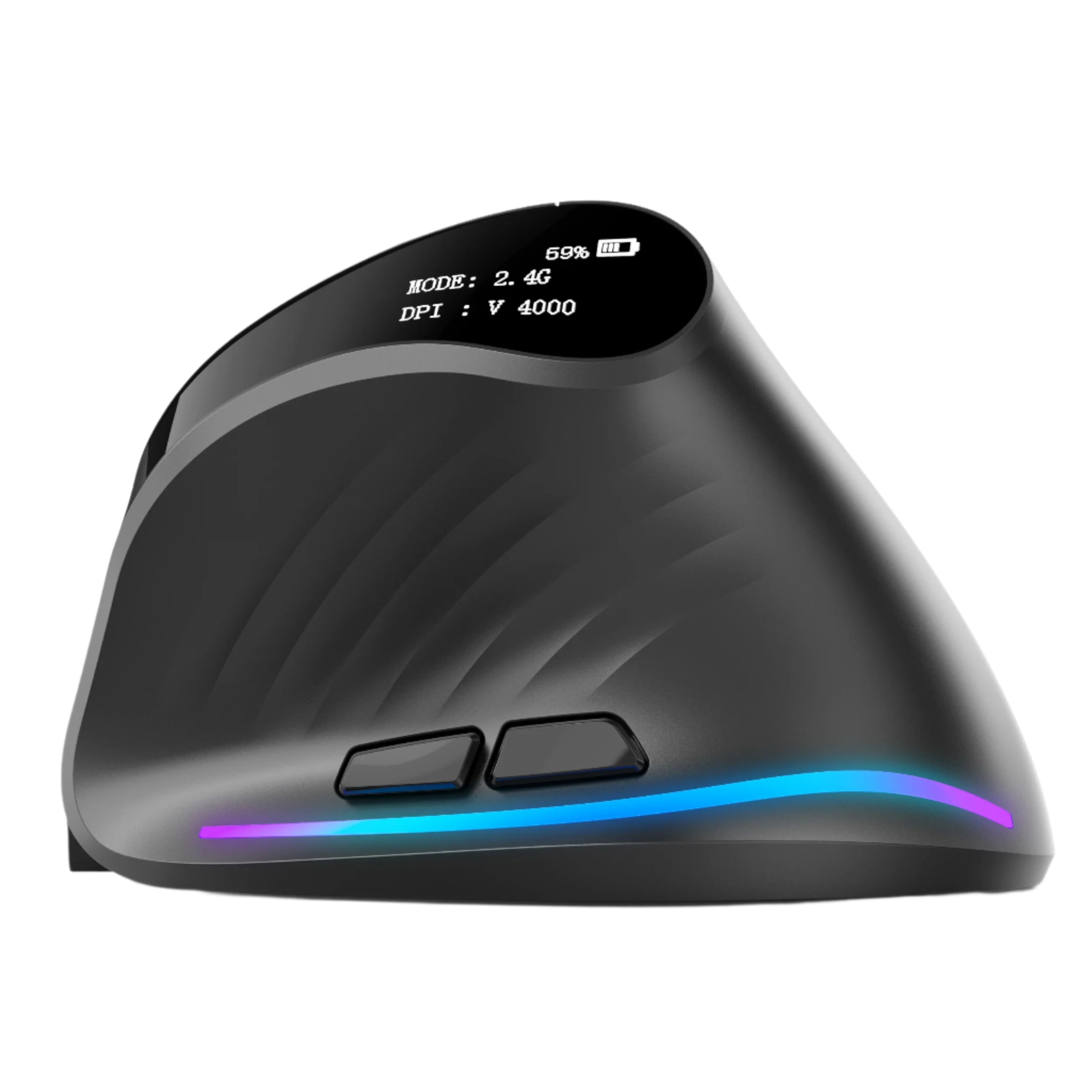
The ErgoX from Smart Mouse Co costs $34.95. That's 7 campus coffees. Half a used textbook. Less than two movie tickets. One-third of one percent of a four-year tuition. And it transforms how you interact with your laptop for the next 2–4 years of your academic career. This isn't a roundup of 10 mice with a chart. This is the case for one specific mouse at one specific price — why it's enough, why it's better than what you're using now, and why the $34.95 is the single highest-ROI purchase a student can make for their laptop setup.
At Smart Mouse Co, mice are our entire business. The ErgoX is the entry point of our collection — and the mouse we recommend to every student who asks "what's the cheapest mouse that's actually good?" This article answers that question with math, scenarios, and honesty.
The Trackpad Tax — What Your Laptop's Built-In Input Is Costing You
You don't think about your trackpad. It's just there. You swipe, tap, scroll, and click without considering whether there's a better way. But there IS a cost — and it compounds across every hour of every study session for every semester you're in school.
The Speed Tax
A trackpad adds approximately 0.5–1 second of friction per interaction compared to a mouse. That doesn't sound like much. Here's the math:
| Daily Task | Interactions/Day | Extra Time (Trackpad vs Mouse) |
|---|---|---|
| Opening/closing browser tabs | ~80 | 40–80 seconds |
| Clicking links while researching | ~120 | 60–120 seconds |
| Scrolling through documents/PDFs | ~200 | 100–200 seconds |
| Selecting text for copy/paste | ~40 | 40–80 seconds |
| Right-click menus | ~30 | 15–30 seconds |
| Navigating between apps/windows | ~60 | 30–60 seconds |
| Daily total | ~530 interactions | 4.75–9.5 minutes lost |
5–10 minutes per day sounds small. Over a semester (120 study days): 10–20 hours lost. Over a 4-year degree (480 study days): 40–76 hours lost. That's an entire week to two weeks of productive time — evaporated by a trackpad. A $34.95 mouse buys that time back.
The Precision Tax
Try this right now: open a spreadsheet and click on cell G47. With a mouse, you click directly on it. With a trackpad, you swipe, lift your finger, swipe again, overshoot, tap back, and finally land on the cell. Now do that 200 times during a statistics assignment. The trackpad doesn't just slow you down — it frustrates you. And frustration during study sessions erodes focus, which erodes comprehension, which erodes grades.
The Comfort Tax
Your hand hovers over a trackpad in a flat, extended position with zero support. During a 5-hour library session, your wrist pronates, your fingers tense, and your forearm accumulates strain you won't notice until you try to write with a pen afterward and realize your hand aches. A mouse — even a basic ergonomic one — supports your palm, positions your fingers naturally, and distributes the work across your grip instead of concentrating it on two fingertips.
The Drag-and-Drop Tax
The single worst interaction on a trackpad. Press down, hold, and simultaneously slide your finger without lifting off the smooth glass surface — while your other fingers try not to accidentally trigger a gesture. Dragging a file into a folder. Dragging an image into a slide. Dragging a citation into a paper. Every drag-and-drop on a trackpad is a minor battle. On a mouse, it's click-hold-move-release. Effortless.
The ErgoX: What $34.95 Actually Gets You
ErgoX — $34.95
Here's exactly what the ErgoX delivers at $34.95 — no marketing fluff, just features:
Wireless Bluetooth connectivity. Pairs with any laptop — MacBook, Chromebook, Windows, iPad — via Bluetooth. No cable. No dongle to lose between your couch cushions. No USB port consumed. Tap pair in Settings, start working. 30 seconds from unboxing to using.
Ergonomic contoured body. Not a flat slab. Not a symmetrical puck. A contoured grip that follows the natural arc of your palm with a raised body that supports your hand instead of letting it hover. This is the feature that makes the difference at hour 4 of a library session when a trackpad user's hand is aching and yours isn't.
Physical scroll wheel. Two-finger trackpad scrolling is gesture-based — you swipe, the content glides, and you overshoot. A scroll wheel is physical — you turn it, the content moves exactly the distance you turned it, and it stops when you stop. For scrolling through 200-page PDFs, 50-page research papers, and 30-tab Chrome sessions, a scroll wheel is transformatively faster and more precise.
Side buttons. Two thumb-accessible buttons for browser back and forward. Instead of reaching for the arrow keys or clicking the tiny back button in Chrome, your thumb presses once. Over 80+ browser navigations per study day, this saves hundreds of micro-interruptions per session. Right-handed users have had this for a decade. At $34.95, you get it too.
Multi-surface tracking. Optical sensor tracks on library tables (polished wood), dorm desks (particleboard), café surfaces (lacquered), lecture hall fold-downs (plastic), and your actual knee on a bus (fabric). No mousepad required. The sensor handles campus surfaces.
Universal compatibility. Works with macOS, Windows, ChromeOS, iPadOS, and Linux. No drivers. No software. No configuration. If your device has Bluetooth, the ErgoX works with it.
$34.95 In Student Money — What It Actually Costs
| $34.95 equals... | How long it lasts |
|---|---|
| 7 campus coffees ($5 each) | Gone in 7 days |
| 2 fast-food meals | Gone in 2 hours |
| Half a used textbook | Used for 1 semester |
| 1 month of a streaming subscription | Gone in 30 days |
| 2 movie tickets | Gone in 2 hours |
| 1 ErgoX wireless mouse | Lasts 2–4 years of college |
At $34.95 used across 4 years of college (roughly 2,000 study days), the ErgoX costs $0.017 per day. Less than two cents per day. For a tool that makes every single interaction with your laptop faster, more precise, and more comfortable for the duration of your degree.
A Day in the Life: The ErgoX Across a Real Student Day
8:30am — Dorm room. You check email, respond to a group project message, and review today's lecture slides. The ErgoX connects the moment you open your laptop. Scroll through the slides. Click through the email. Side-button back to inbox. 15 minutes, 40+ interactions, zero friction.
10:00am — Lecture hall. You take notes on your laptop during a 75-minute class. Between typing, you click between your notes app and the professor's shared slides. The ErgoX sits next to your laptop on the fold-down desk. Compact enough to fit beside a 13-inch MacBook. Quiet enough that the student next to you doesn't notice.
12:00pm — Campus café. You eat lunch while browsing sources for your research paper. 20 tabs open. Side buttons for forward/back between sources. Scroll wheel for scanning long articles. The trackpad would require you to gesture-swipe between tabs or click the tiny arrow buttons. The mouse just works. Tracked fine on the wooden café table.
2:00pm — Library. The main event. 4-hour deep study block. Essay writing in Google Docs. Citation management in Zotero. Source scanning across 15+ academic papers. This is where the ErgoX earns its $34.95 — your hand rests on a contoured grip instead of hovering over a flat trackpad. At hour 3, when trackpad users are shaking out their hands, your hand feels the same as it did at hour 1.
6:00pm — Back at the dorm. Dinner break, then 2 more hours of work — editing the essay, formatting the bibliography, building a presentation for tomorrow's seminar. The ErgoX has been in your backpack through 4 location changes today. It connected instantly at each stop. It handled every surface. It didn't take up any more space than a granola bar.
10:00pm — Late night. Your roommate is asleep. You're finishing the bibliography. The ErgoX's clicks are audible in the silence — they're not silent-switch quiet — but they're softer than most budget mice. (If your roommate is a truly light sleeper, the Lumos at $59 has completely silent clicks. But for most dorm situations, the ErgoX is quiet enough.)
When $34.95 Isn't Enough — Honest Upgrade Paths
The ErgoX is the best budget mouse for students. It's not the best mouse for every student. Here's when spending more makes sense — and exactly how much more:
| If you need... | Upgrade to... | Extra cost |
|---|---|---|
| Completely silent clicks (dorm/library) | Lumos — $59 | +$24.05 |
| Better ergonomic comfort for 4+ hour sessions | ErgoGlide — $49.95 | +$15.00 |
| Vertical wrist support for 6+ hour sessions | Verta — $59 | +$24.05 |
| A mouse AND a presentation clicker for seminars | Air Nova — $89 | +$54.05 |
| Zero desk space (trackball) | Orbit — $59 | +$24.05 |
| The absolute smallest mouse possible (pen) | PenX — $37.95 | +$3.00 |
| Premium adjustable vertical for grad school marathons | Elevate Pro — $89 | +$54.05 |
Every upgrade in this table links directly to the product. Every price is the real price. The ErgoX at $34.95 is the right starting point for most students. The upgrades are there when your needs outgrow the budget tier — which for many students happens in junior or senior year when sessions get longer and presentations get more frequent.
The ErgoX vs What You're Probably Considering
| Feature | ErgoX ($34.95) | Your Trackpad ($0) | Amazon $12 Mouse | Logitech M185 ($15) |
|---|---|---|---|---|
| Ergonomic shaping | ✅ Contoured | ❌ Flat glass | ❌ Flat plastic | ❌ Minimal |
| Scroll wheel | ✅ Physical | ❌ Gesture swipe | ✅ Basic (often crunchy) | ✅ Basic |
| Side buttons | ✅ 2 thumb buttons | ❌ None | ❌ Usually none | ❌ None |
| Bluetooth | ✅ Yes | Built-in | ❌ Usually USB-A dongle only | ❌ USB-A dongle only |
| MacBook compatible without adapter | ✅ Yes (Bluetooth) | Built-in | ❌ Needs USB-C adapter | ❌ Needs USB-C adapter |
| Expected lifespan | 2–4 years | Lifespan of laptop | 3–8 months | 1–2 years |
| Comfort at hour 4 | ✅ Supported palm | ❌ Aching fingers | ❌ Flat, no support | ❌ Small, cramped |
vs Your Trackpad: Free, but costs 10–20 hours of productivity per semester, creates hand fatigue during long sessions, and makes drag-and-drop a minor nightmare. The ErgoX at $34.95 buys back that time and comfort for the rest of your degree.
vs Amazon $12 Mouse: Cheaper by $23, but typically no Bluetooth (USB-A dongle only = needs adapter for MacBook), no ergonomic shaping, no side buttons, and lasts 3–8 months before the scroll wheel fails. Two replacements in a year cost $24 — bringing the real price to $36 with worse quality.
vs Logitech M185 ($15): The most popular "budget mouse" in existence. No Bluetooth (dongle only). No side buttons. No ergonomic contouring. Minimal scroll quality. The ErgoX costs $20 more and delivers Bluetooth, side buttons, ergonomic shaping, and better build quality. The $20 buys 2+ years of better daily use.
Why Buy From Smart Mouse Co — Not Amazon
Search "cheap wireless mouse" on Amazon. You'll get 12,000 results sorted by ad spend, not quality. The top results are sponsored. The reviews mix genuine feedback with incentivized 5-star plants. The product photos are often stock images shared across multiple unrelated listings. You'll spend 20 minutes comparing options that all look identical and still won't know which one is good.
Smart Mouse Co is a specialist. The ErgoX was selected because it meets our quality standard for ergonomic shaping, wireless reliability, and build durability — not because it maximizes our margin. It's part of a curated collection where every product is evaluated by a team whose entire job is mice.
Free worldwide shipping. Direct customer support: contact@smartmouseco.com / +1 240-202-9397. Physical address: 200 E Pratt St, Baltimore, MD 21202. When you buy from a brand with a name, an address, and a phone number, you get accountability that random Amazon third-party sellers can't match.
Frequently Asked Questions
Is $34.95 really enough for a good mouse?
Yes. $34.95 is the floor for a quality wireless mouse with ergonomic shaping, side buttons, and Bluetooth connectivity. Below $30, you're in generic territory — flat plastic bodies, dongle-only wireless, no side buttons, scroll wheels that develop problems within months. At $34.95, the ErgoX delivers genuine ergonomic design at the lowest price point where build quality is reliable for multi-year daily use.
Will the ErgoX work with my MacBook?
Yes. The ErgoX connects via Bluetooth — no dongle, no USB port, no adapter needed. It pairs through System Settings → Bluetooth on any MacBook running macOS. Left click, right click, scroll, and side buttons all function natively without drivers or software.
Will it work with my Chromebook?
Yes. ChromeOS supports Bluetooth mouse input natively. The ErgoX pairs through Settings → Bluetooth and works immediately. No drivers. No configuration.
How long does the battery last?
Weeks to months on a single charge depending on usage intensity. For a typical student using the mouse 4–6 hours daily, expect several weeks between charges. The battery outlasts any exam period. Charges via USB-C — the same cable that charges your laptop.
Is it too loud for a library?
The ErgoX has standard click switches — audible but not aggressively loud. In a general library area, it's perfectly acceptable. In a strict quiet zone at midnight, the clicks are noticeable. If absolute silence is a priority (sleeping roommate, library quiet floor, lecture hall), the Lumos at $59 has completely silent click switches. For most campus scenarios, the ErgoX's noise level is fine.
Should I buy a more expensive mouse instead?
If your budget is tight, the ErgoX at $34.95 is genuinely enough for the next 2–4 years. You don't NEED to spend $59 or $89. The ErgoX handles every academic task — essays, research, spreadsheets, presentations, browsing — with real comfort and real precision. If your budget has room and you study 6+ hours daily, the ErgoGlide at $49.95 or the Verta at $59 add better ergonomic support for long sessions. But the ErgoX is never the wrong choice. It's the foundation.
Can I use it for gaming too?
Yes. The ErgoX handles casual gaming — indie titles, strategy, RPGs, MMOs, browser games — without issues. It's not optimized for competitive FPS (you'd want a dedicated gaming mouse for that), but for the 90% of gaming that students do between study sessions, it works perfectly. One mouse. Studying and gaming. $34.95.
Conclusion — The Math Is Simple
You have two options:
Option A: Continue using your trackpad. Lose 10–20 hours of productivity per semester. Accumulate hand fatigue during every long study session. Fight with drag-and-drop. Overshoot cells in spreadsheets. Gesture-swipe through 200-page PDFs one painful swipe at a time. Cost: $0 upfront. 40–76 hours of lost productivity over a 4-year degree.
Option B: Buy the ErgoX. Gain back 10–20 hours per semester. Study with a supported hand instead of an aching one. Scroll with a wheel. Navigate with side buttons. Connect via Bluetooth to any device in 30 seconds. Cost: $34.95 once. Use it for 2–4 years. $0.017 per day.
$34.95. Free worldwide shipping. The single highest-ROI purchase in your entire student setup.
$34.95. 7 Coffees. 2–4 Years of Better Studying.
The ErgoX — wireless, ergonomic, Bluetooth, and built for students who'd rather spend money on coffee than on a mouse.
- ✓ Bluetooth — works with MacBook, Chromebook, Windows, iPad
- ✓ Ergonomic contoured grip + scroll wheel + side buttons
- ✓ $0.017 per day over 4 years of college
- ✓ Free worldwide shipping
Get the ErgoX — $34.95 →
Need more options? Browse the full Smart Mouse Co collection →






Leave a comment
This site is protected by hCaptcha and the hCaptcha Privacy Policy and Terms of Service apply.