







Everyone who works at a desk uses a mouse — it's the tool you touch thousands of times a day, more than your keyboard or phone in many cases. But most people grab the cheapest option available, thinking "it's just a mouse." At first glance, that $15 plastic brick from the big-box store seems fine. It clicks, it scrolls, it moves the cursor.
But after a few hours of dragging across spreadsheets, switching between emails and documents, or fine-tuning a presentation, the differences start to show: jittery tracking that forces constant corrections, an uncomfortable grip that leaves your wrist aching, and buttons that feel mushy or loud enough to distract the person next to you.

In reality, the gap between a cheap mouse and a premium one isn't just about price — it's about ergonomics, performance, durability, and how much they impact your daily workflow and long-term health. This article breaks down the real, practical differences, backed by ergonomics research and real-world testing, to help you decide if that "bargain" mouse is costing you more than you think.
What We Mean by “Cheap” vs “Premium”
Let's define our terms clearly. A cheap mouse is typically $10–$30: basic optical sensor, plastic build, symmetrical or flat shape, limited buttons, and often a short 1-year warranty. These are the ones bundled with office PCs or grabbed on sale — functional for casual browsing, but not optimized for 8–10 hour workdays.
A premium mouse starts at $60+: advanced sensors, ergonomic sculpting, premium materials, customizable buttons, long battery life (or reliable wired options), and 2–3 year warranties with better support. They're designed for professionals who treat their desk like a cockpit, not a temporary station.
The key? Premium mice aren't "fancy" — they're engineered for value over time, reducing strain and boosting efficiency in ways cheap ones can't.
Build Quality & Materials
Cheap mice use injection-molded ABS plastic that's lightweight but slippery when your hand sweats after three hours. Buttons feel hollow, with inconsistent travel that makes every click a gamble. Scroll wheels wobble or grind, leading to skips in long documents.
Premium mice employ matte coatings, rubberized grips, and weighted balances that feel solid and secure. Buttons have crisp, consistent actuation rated for 50–90 million clicks (vs 5–10 million in cheap ones). Scroll wheels use electromagnetic mechanisms that stop on a dime or free-spin through 100-page reports.
Real scenario: A cheap mouse's plastic shell cracks after 18 months of daily use, forcing a replacement. A premium one like the Air Nova Smart Mouse lasts 5+ years, saving money and frustration long-term.
Sensor Quality & Tracking Accuracy
The sensor is the mouse's brain. Cheap mice use basic optical sensors that struggle on glossy desks or under office lighting, causing cursor jitter, drift, or skipped pixels. This forces constant correction movements — tiny but they add up to minutes lost per hour.
Premium mice feature advanced sensors (like PixArt 3395 derivatives) with 32,000+ DPI, zero acceleration, and flawless tracking on any surface, including glass. This means precise cursor placement in Excel cells, smooth dragging in PowerPoint, or accurate highlighting in Word — no fighting the tool.
Real scenario: In a 200-column spreadsheet, a cheap mouse skips 2–3 pixels per drag, requiring 15% more movements. A premium sensor cuts that to zero, saving 30–45 minutes a week in data entry alone.
Ergonomics & Comfort
Cheap mice are flat and symmetrical, forcing your wrist into 40–60° extension — a recipe for carpal tunnel over time. After 4–6 hours, your hand guards against discomfort, slowing movements and reducing accuracy.
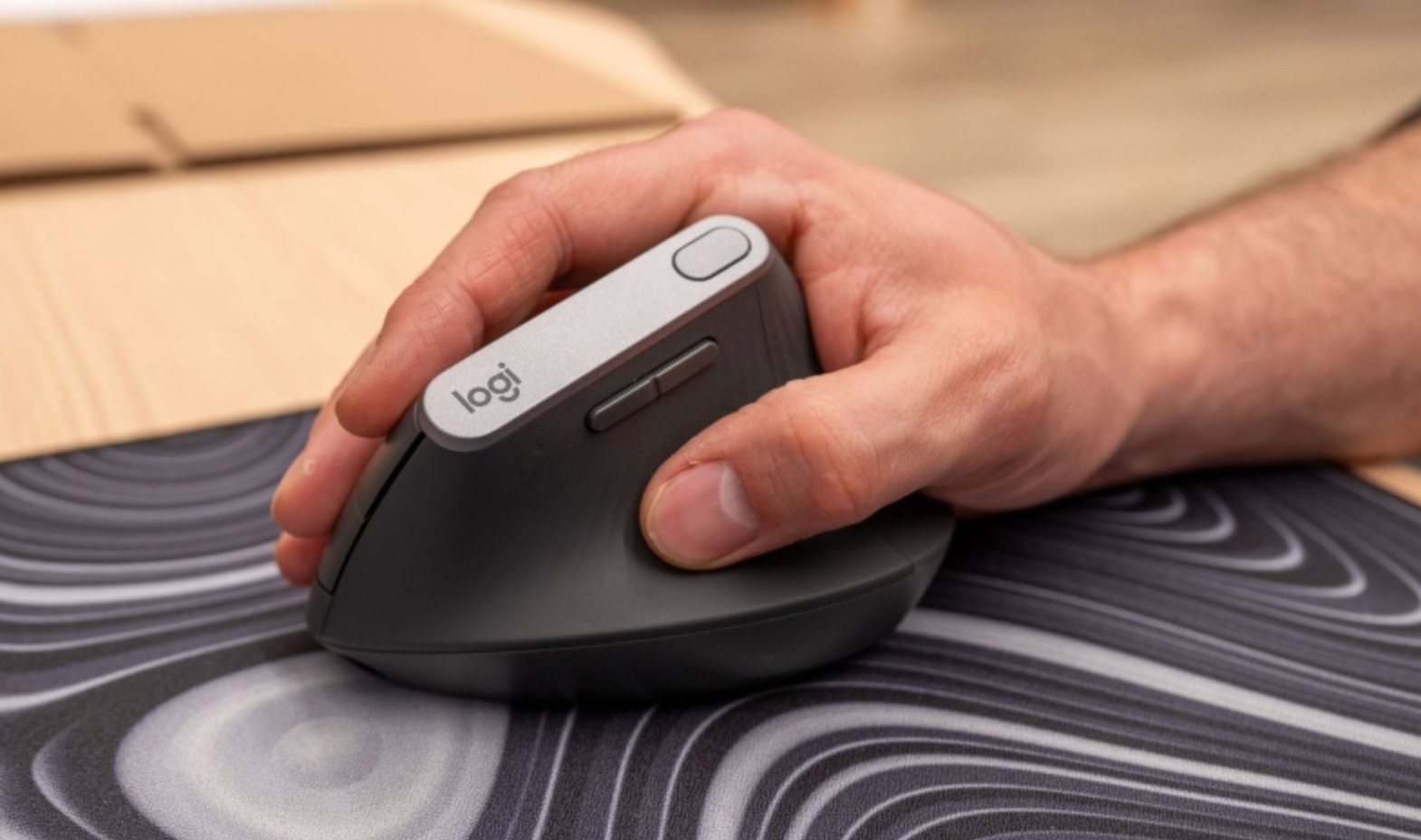
Premium mice use sculpted, right-handed designs with thumb rests and palm support, keeping your wrist at a neutral 0–25° angle. This reduces muscle load by 40–60% and prevents inflammation.
Real scenario: A cheap mouse leads to forearm burn by lunch. A premium one like the Air Nova Smart Mouse lets you work comfortably through 10-hour days. For even better ergonomics, pair it with the Touch Nova Smart Keyboard Collection.
Latency & Wireless Performance
Cheap wireless mice use old Bluetooth chips with 10–40 ms delay — noticeable when dragging across monitors or switching apps. They drop connections in busy Wi-Fi offices, forcing resets mid-task.
Premium mice run proprietary 2.4 GHz chips with sub-1 ms latency, feeling wired but free. Batteries last 200–300 hours, with fast-charge options.
Real scenario: Cheap latency turns a quick file drag into a stuttery mess. Premium wireless feels instant, saving seconds per action that compound into hours weekly.
Features That Matter (Buttons, Shortcuts, Customization)
Cheap mice have two buttons and a basic wheel — fine for browsing, useless for efficiency.
Premium mice add 8–12 programmable buttons, gesture controls, and dual-mode wheels (free-spin for documents, tactile for timelines). Software lets you map copy/paste, app switch, or undo to thumb buttons.
Real scenario: In PowerPoint, a cheap mouse means constant keyboard reaching. Premium buttons cut task time by 25% — more time for actual thinking.
Warranty, Reliability & Long-Term Value
Cheap mice have 1-year warranties (if any) and fail after 12–24 months from switch wear or sensor drift.
Premium mice offer 2–3 years, with switches rated for 50 million clicks and better support. Total cost: a $20 cheap mouse replaced yearly = $100 over 5 years. A $89 premium lasts 5+ years = $89 total.
Real scenario: Cheap mice break during busy seasons. Premium reliability means no downtime.
Real Workflow Examples
Spreadsheet heavy day: Cheap sensor skips cells — 20% more corrections. Premium tracks perfectly — faster analysis.
Designing UI assets: Cheap grip cramps after 2 hours. Premium ergonomics keep you creative all day.
Remote meetings: Cheap clicks echo on calls. Premium silence keeps you professional.
Web browsing and research: Cheap scroll skips lines. Premium free-spin flies through 100-page PDFs.
Editing timelines: Cheap latency stutters. Premium feels instant in PowerPoint or Google Slides.
Productivity Gains: Is Premium Worth It?
Mathematically: 1% faster clicking (from better tracking) on 50,000 daily actions = 500 seconds saved (8 minutes). Less fatigue = 30–60 minutes more focused work daily. Over a year, that's 50–100 hours gained — a full workweek or more.
Psychologically: Comfort reduces stress, boosts decision-making. Premium mice like Air Nova turn "tool" into "extension of your hand."
Why Air Nova Smart Mouse Is a Great Premium Choice
Our Air Nova Smart Mouse bridges the gap between affordable and elite:
- Ergonomic profile — sculpted for all-day comfort without fatigue
- Precision sensor — 32,000 DPI for flawless tracking on any surface
- Dual-mode controls — free-spin scroll for documents, tactile for precision
- Silent switches — premium feel without noise
- Low-latency wireless — sub-1 ms response
- $89 value — premium features at accessible price
Explore the Smart Mouse Collection for colors and finishes.
How to Choose What’s Right for You
- Daily use >6 hours? Prioritize ergonomics
- Spreadsheet heavy? High-DPI sensor
- Budget under $50? Focus on silent clicks
- Health concerns? Ergonomic shape first
Checklist: Comfort > accuracy > features > price.
Accessories that Complement Your Mouse (Air Nova Ecosystem)
A great mouse shines brighter with the right setup:
- Touch Nova Smart Keyboard Collection — low-profile typing with macro shortcuts
- CyberDock 3-in-1 Wireless Charging Station — clean desk, always charged
- NovaPad 14 Productivity Tablet — second screen for multitasking
Final Verdict
Cheap mice might be okay for occasional use, but for daily office workflows, they cost you time, comfort, and health in ways that add up fast.
Premium mice are worth the investment because they deliver ergonomic comfort, precise performance, and long-term reliability that cheap ones can't touch.
The Air Nova Smart Mouse offers the perfect blend — upgrade today and feel the difference.
Get the Air Nova Smart Mouse now and transform your workday.





Leave a comment
This site is protected by hCaptcha and the hCaptcha Privacy Policy and Terms of Service apply.