






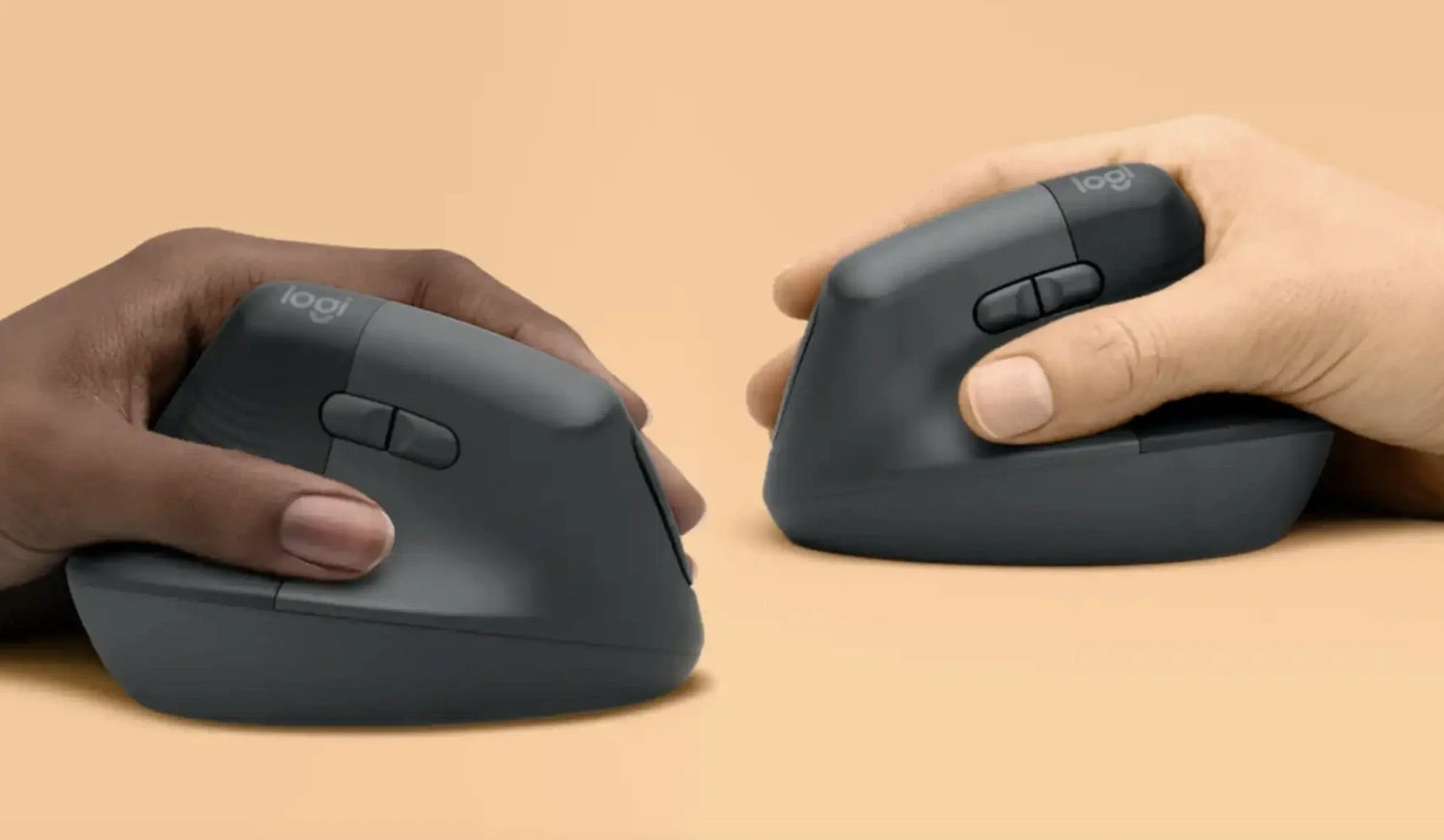
The vertical mouse is no longer a niche ergonomic experiment. It's a 49,500-searches-per-month product category that's growing faster than any other mouse segment. Logitech, Evoluent, Anker, Razer, and dozens of smaller brands now compete in the vertical mouse space — because the core concept works.
A handshake-grip mouse that keeps your forearm neutral instead of twisted is simply more comfortable for long sessions than a flat mouse. The science isn't debated anymore. The only question is which vertical mouse to buy.
That question is harder than it should be. The Logitech MX Vertical ($79.99) is the most-searched vertical mouse but locks you into a single fixed angle. The Evoluent VerticalMouse 4 ($89.95) offers a steeper tilt but hasn't been redesigned in years. The Anker vertical mouse ($15–$25) is cheap but feels like it. And most "vertical mouse" Amazon results are generic, unbranded units with inconsistent quality and dubious reviews.
At Smart Mouse Co, mice are our entire business — and vertical mice are the fastest-growing category in our collection. This guide covers the best vertical mice available in 2026, compares them against the most-searched competitors, and helps you choose the right one based on your actual workflow. No affiliate links to products we haven't vetted. No filler models. Just vertical mice curated by the only brand that does nothing but mice.
Quick Picks: Best Vertical Mouse by Use Case
| Mouse | Best For | Price | Highlight |
|---|---|---|---|
| Elevate Pro | Adjustable-angle vertical for all-day work |
|
⭐ Best Overall Vertical |
| Verta | Mid-range vertical for everyday use | $59 | ⭐ Best Value Vertical |
| ErgoGlide | Semi-vertical ergonomic on a budget | $49.95 | ⭐ Best Budget Ergonomic |
| ErgoMax | Full-size vertical for large hands | $59 | ⭐ Best Full-Size |
| Lumos | Silent vertical for shared spaces | $59 | ⭐ Best Silent Vertical |
Browse all 17 Smart Mouse Co mice →
What Is a Vertical Mouse and Why Does It Work?
A vertical mouse tilts your hand into a handshake position — roughly 50 to 70 degrees from the desk surface. Instead of your palm facing flat down (pronated), your hand rests on its side with the thumb on top. This single change keeps the two bones in your forearm (the radius and ulna) parallel instead of crossed, which is the default state when your palm faces down on a flat mouse.
Why this matters: the pronated position forces your forearm muscles to hold a rotational position for as long as you use the mouse. Over an 8-hour workday, that sustained rotation creates tension in the forearm, wrist, and fingers. A vertical mouse eliminates that rotation entirely. Your forearm rests in its natural position. The muscles that would otherwise hold the pronation are relaxed. The result is measurably less fatigue, tension, and discomfort during extended use.
This isn't theory — it's why vertical mice have grown from a niche product to a category searched 49,500 times per month. The Logitech MX Vertical, Evoluent VerticalMouse, and Anker vertical mouse all exist because the concept works. The debate isn't whether vertical mice are better for long sessions. The debate is which vertical mouse delivers the best combination of angle, comfort, features, and price.
Vertical Mouse Competitor Landscape — Where the Big Brands Fall Short
Before recommending Smart Mouse Co's vertical models, let's be honest about what the most-searched competitors offer and where they leave gaps:
Logitech MX Vertical — 12,100 monthly searches
The most popular vertical mouse by search volume. 57-degree fixed angle. Bluetooth + USB receiver. Rechargeable via USB-C. 4,000 DPI sensor. Logitech Options+ software for button customization. Priced at $79.99. The limitation: a single fixed tilt angle that works for some hand sizes and grip styles but not all. No adjustment mechanism. If 57 degrees doesn't suit your hand, you're stuck with it. The design hasn't fundamentally changed since its 2018 launch.
Evoluent VerticalMouse 4 — 4,400 monthly searches
The original vertical mouse pioneer. Steeper tilt angle than the Logitech. Available in wired and wireless, right-handed and left-handed (rare). Priced at $89.95. The limitation: the design is aging. The build quality and button feel reflect a product that was cutting-edge years ago but hasn't kept pace with modern wireless standards or ergonomic refinement. The software is Windows-focused with limited macOS support.
Anker Vertical Mouse — 2,900 monthly searches
The budget vertical option. Priced at $15–$25. 2.4GHz wireless. Basic ergonomic shape. The limitation: build quality matches the price. Plastic feels hollow. Buttons lack the tactile crispness of mid-range models. The scroll wheel is notchy and imprecise. The tilt angle is generic — not tuned for any specific hand size. For a first experiment with vertical mice it's adequate; for daily professional use it falls short.
Razer Vertical Mouse — 2,900 monthly searches (trending)
Razer's entry into the vertical category is relatively recent and gaining search momentum. Gaming-grade sensor. RGB lighting. Wired. Priced around $69.99–$79.99. The limitation: wired only (no wireless option), which is a significant drawback for modern desk setups. RGB lighting is unnecessary for work use and adds cost without ergonomic benefit.
Where Smart Mouse Co fits
Smart Mouse Co's vertical mice address the specific gaps these competitors leave: adjustable tilt angle (no competitor offers this at any price), wireless Bluetooth connectivity (not wired like Razer), modern build quality (not aging like Evoluent), and specialist curation (not a single model in a 200-product catalog like Logitech). At $49.95–$89, the pricing sits at or below the big-brand competitors while offering features they don't have.
Why Smart Mouse Co? Because Mice Are Our Only Business
Logitech makes vertical mice alongside 200+ other peripherals. Evoluent makes vertical mice but hasn't updated their core design in years. Anker makes vertical mice as a sideline to their battery packs and cables. Razer makes a vertical mouse alongside gaming chairs, keyboards, and headsets. None of them specialize.
Smart Mouse Co is different. Mice are the entire brand. Vertical mice are our fastest-growing category. Every vertical model in our collection is curated for wireless connectivity, ergonomic precision, and the long-session workflows that drive people to search for "vertical mouse" in the first place. When you buy from a specialist, you get products selected by people whose entire job is evaluating mice — not peripherals managers who also oversee webcam SKUs.
Free worldwide shipping on every order. Every vertical mouse is wireless. Every vertical mouse works with Mac, Windows, iPad, and Chromebook. No driver software required.
The Best Vertical Mice in 2026, Ranked
Best Overall Vertical Mouse
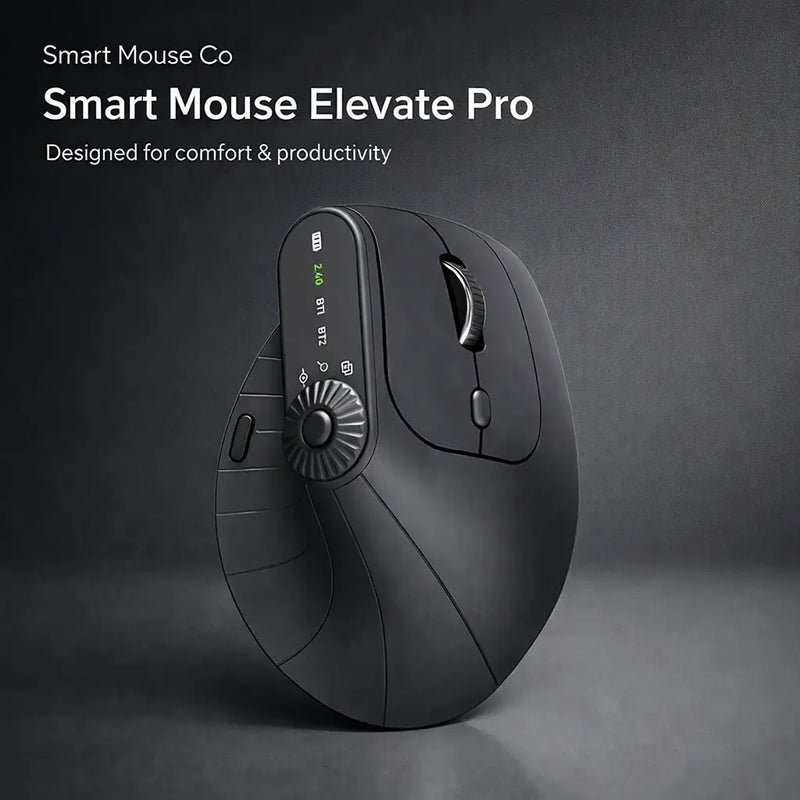
Elevate Pro — $129 $89
⭐ BEST OVERALL VERTICAL MOUSE
Best for: All-day desk workers, developers, designers, analysts, writers — anyone who uses a computer 5+ hours daily and wants the best vertical ergonomic mouse available.
The Elevate Pro is the only vertical mouse on the market with a physical adjustment knob that lets you dial in your exact preferred wrist angle. Every other vertical mouse — the Logitech MX Vertical, the Evoluent VerticalMouse 4, the Anker, the Razer — locks you into one fixed tilt. The Elevate Pro lets you find the angle that's right for your specific hand size, grip style, and desk height. That's not a minor feature. It's the difference between a vertical mouse that works for your hand and one that works for the average hand.
Bluetooth wireless for any device. Smooth scroll wheel. Side buttons accessible in the vertical grip. Available in White, Black, and Beige — colors that match modern desk aesthetics rather than the all-black gaming aesthetic that most vertical mice default to. At $89 (down from $129), it's priced $9 above the Logitech MX Vertical ($79.99) and at the same price as the Evoluent VerticalMouse 4 ($89.95) — while offering the tilt adjustment that neither competitor has.
Elevate Pro vs Logitech MX Vertical: Both are wireless. Both are ergonomic vertical designs. The Elevate Pro has adjustable tilt angle (MX Vertical: fixed at 57°). The Elevate Pro is $9 more. The adjustable tilt is worth significantly more than $9 for anyone whose hand doesn't perfectly suit Logitech's single fixed angle.
Elevate Pro vs Evoluent VerticalMouse 4: Both are priced at ~$89. The Elevate Pro has adjustable tilt, modern Bluetooth, and a 2026 design. The Evoluent has a steeper fixed angle and an aging design. For new buyers, the Elevate Pro is the more modern, more flexible choice.
Best Value Vertical Mouse
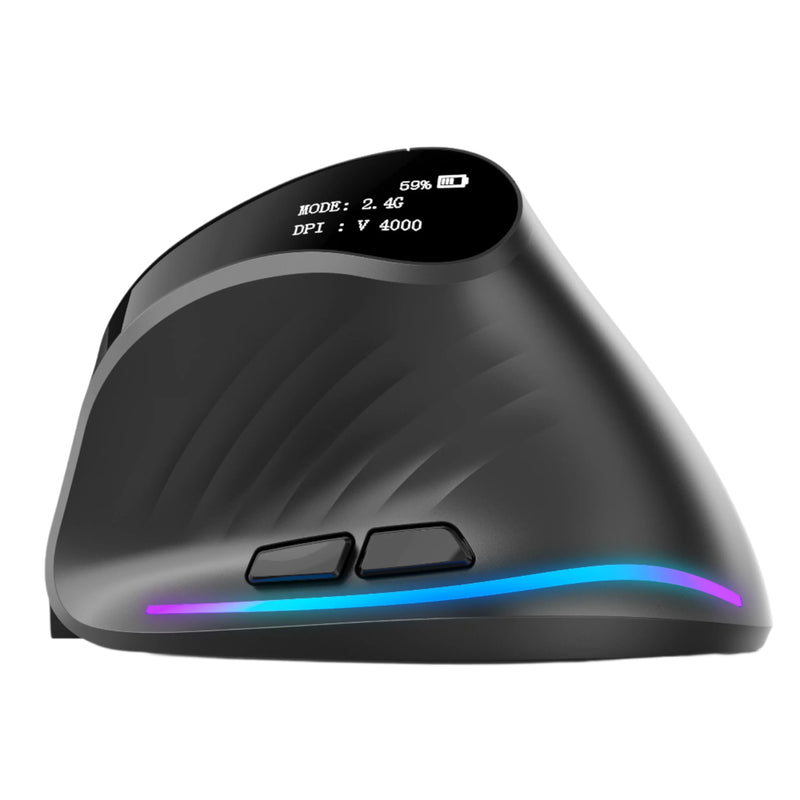
Verta — $59
⭐ BEST VALUE VERTICAL MOUSE
Best for: Workers who want genuine vertical ergonomic design at $20–$30 less than the Logitech MX Vertical — the mid-range vertical that punches above its price.
The Verta delivers the core vertical mouse benefit — a handshake grip that keeps your wrist neutral — at $59. That's $20 below the Logitech MX Vertical ($79.99), $30 below the Evoluent VerticalMouse 4 ($89.95), and significantly above the Anker's build quality. The fixed tilt angle is well-calibrated for the majority of hand sizes. Wireless connectivity. Side buttons positioned for comfortable thumb access in the vertical grip.
For users who've been researching vertical mice and hitting a price barrier — or for offices equipping multiple desks — the Verta makes the economics work. At $59, you can try a quality vertical mouse for less than the cost of a single Logitech or Evoluent, and the ergonomic benefit is the same fundamental concept: tilted hand, neutral forearm, reduced tension during long sessions.
Verta vs Anker vertical mouse: Both are budget-tier. The Verta costs ~$35 more. The build quality, scroll precision, button feel, and wireless reliability are in a different class. The Anker is a $20 experiment. The Verta is a $59 tool you'll use for years.
Best Budget Ergonomic Mouse (Semi-Vertical)
ErgoGlide — $49.95
⭐ BEST BUDGET ERGONOMIC
Best for: Users who want ergonomic comfort but aren't ready for a full vertical design — the transition step between a flat mouse and a vertical mouse.
Not everyone wants to jump straight to a 60-degree vertical grip. The ErgoGlide offers a contoured ergonomic design with a moderate tilt — more angled than a flat mouse, less extreme than a full vertical. It's the gateway mouse for users who know their flat mouse isn't working but aren't sure they're ready for the full handshake position.
At $49.95, it's the most affordable ergonomic option in this guide and provides a meaningful comfort upgrade from any generic flat mouse. Wireless connectivity, smooth scrolling, and a build quality that handles daily professional use. For people searching "vertical mouse" because they're curious but hesitant, the ErgoGlide is the low-risk first step that demonstrates what ergonomic shaping actually feels like.
Best Full-Size Vertical Mouse
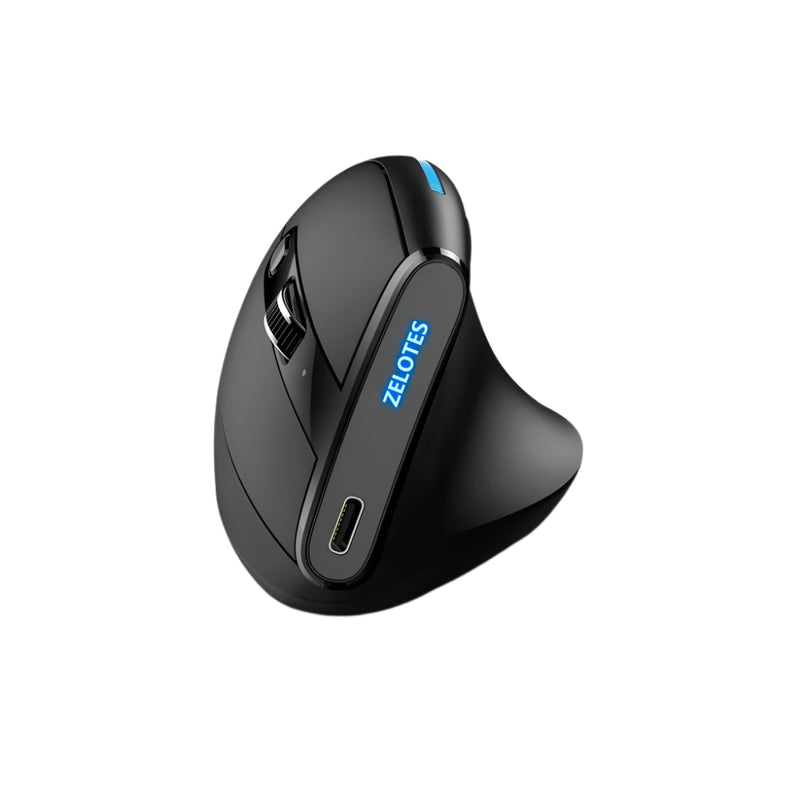
ErgoMax — $59
⭐ BEST FULL-SIZE VERTICAL
Best for: Users with medium-to-large hands who find most vertical mice too small — the Evoluent VerticalMouse alternative with a modern full-size body.
One of the most common complaints about vertical mice — including the Logitech MX Vertical and many Anker models — is that they're too small for larger hands. The grip feels cramped. Fingers overhang the buttons. The palm doesn't fully contact the body. The ErgoMax solves this with a full-size ergonomic body that supports a complete palm grip in the vertical position.
For users with hands that measure 19cm+ from wrist to fingertip, the ErgoMax is the vertical mouse that finally fits. Wireless connectivity, responsive tracking, and a scroll wheel positioned at the right height for a full-size vertical grip. At $59, it matches the Verta's price point while serving a different hand size. If you've tried a vertical mouse and found it too small, the ErgoMax is the answer.
Best Silent Vertical Mouse
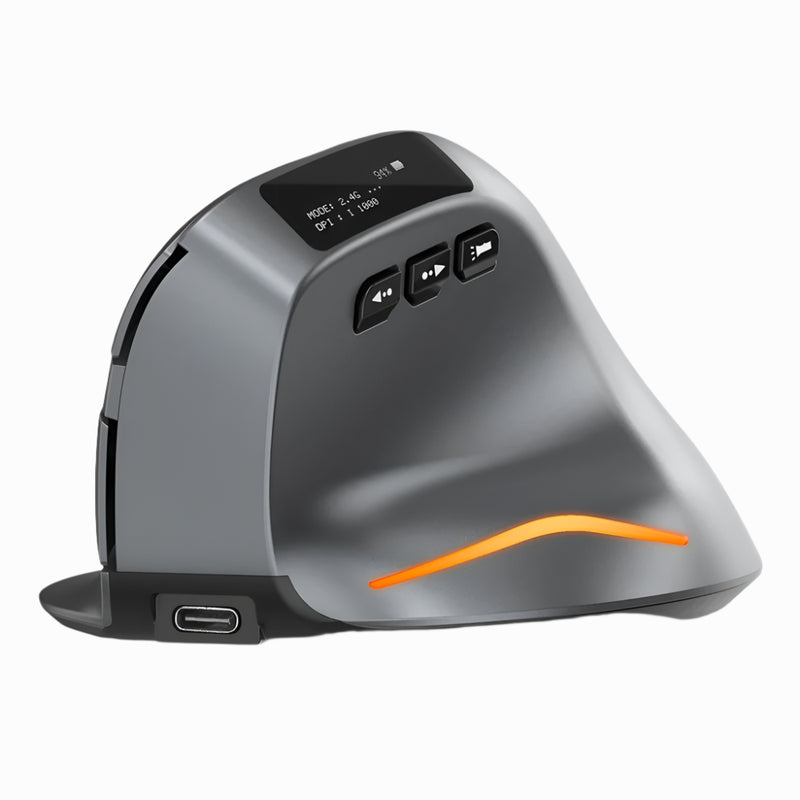
Lumos — $59
⭐ BEST SILENT VERTICAL
Best for: Vertical mouse users who work in open offices, shared spaces, or during video calls — where click noise is a real problem.
No major vertical mouse competitor offers a silent-click version. The Logitech MX Vertical clicks audibly. The Evoluent clicks audibly. The Anker clicks audibly. The Razer clicks loudly. The Lumos is the vertical mouse that solves the noise problem that every other vertical mouse ignores. Silent click switches eliminate audible clicking while maintaining tactile feedback.
For open-plan offices where every click is heard by the desk next to you. For video calls where your microphone picks up every mouse sound. For late-night work sessions where your partner is sleeping. The Lumos combines the ergonomic benefit of a vertical grip with the silence that modern shared workspaces demand. At $59, wireless, Bluetooth compatible, and quieter than touching a trackpad.
Complete Vertical Mouse Comparison: Smart Mouse Co vs Competitors
| Feature | Elevate Pro | Verta | Logitech MX Vertical | Evoluent VM4 | Anker Vertical |
|---|---|---|---|---|---|
| Price | $89 | $59 | $79.99 | $89.95 | $15–$25 |
| Adjustable tilt | ✅ Yes (knob) | ❌ Fixed | ❌ Fixed 57° | ❌ Fixed ~80° | ❌ Fixed |
| Wireless | ✅ Bluetooth | ✅ Wireless | ✅ BT + USB | ✅ Wireless | ✅ 2.4GHz |
| Silent clicks | ❌ | ❌ | ❌ | ❌ | ❌ |
| Color options | White/Black/Beige | Standard | Graphite only | Black only | Black only |
| Design era | 2025 | 2025 | 2018 | 2013 | 2017 |
| Mac compatible | ✅ | ✅ | ✅ | ⚠️ Limited | ✅ |
Note: The Lumos ($59) is the only vertical mouse from any brand that offers silent click switches — a feature no competitor in this table provides.
Vertical Mouse for Gaming — Does It Work?
"Vertical mouse gaming" and "vertical mouse for gaming" combine for 5,300+ monthly searches — a significant audience wondering if they can game on a vertical mouse. The honest answer:
Yes, for most gaming. MMOs, MOBAs, strategy games, RPGs, simulation games, casual titles, and indie games all work well with a vertical mouse. The ergonomic grip actually improves sustained gaming sessions by reducing the fatigue that builds during 3–5 hour play blocks. Side buttons handle ability binds, weapon swaps, and communication macros.
With caveats for competitive FPS. Wide, fast horizontal flicks — the bread and butter of competitive FPS aiming — use a different muscle pattern on a vertical mouse than a flat one. Most players adapt within a week. Some find that fast lateral tracking feels slightly less natural. For ranked FPS play at high levels, a traditional flat mouse may offer a marginal speed advantage for wide flick shots. For everything else, a vertical mouse is fully competitive.
The practical recommendation: If you game AND work on the same setup (which describes most gamers in 2026), a vertical mouse gives you better comfort during the work hours and competitive-enough performance during the gaming hours. The net benefit across a full day is positive. If you're a professional esports FPS player, keep your flat gaming mouse for competition and use a vertical for everything else.
Vertical Mouse Benefits — What's Real and What's Marketing
With 320 monthly searches for "vertical mouse benefits," people want honest answers. Here's what's real:
Real benefit: reduced forearm pronation. This is the core value proposition and it's well-supported. A vertical grip keeps your forearm bones parallel. A flat grip forces them to cross. Reducing that rotation reduces the tension in forearm muscles during sustained use. This is measurable and consistent across users.
Real benefit: more sustainable grip for long sessions. Users who switch from flat to vertical consistently report less hand and forearm fatigue during 4+ hour sessions. The handshake position distributes hand weight more naturally across the palm rest.
Real benefit: reduced wrist deviation. Vertical mice align your wrist in a more neutral position, reducing the sideways bend (ulnar deviation) that flat mice create during horizontal cursor movement.
Marketing exaggeration: "cures carpal tunnel." No mouse cures anything. Vertical mice can reduce factors that contribute to discomfort, but they are not medical devices and should never be marketed as treatments. If you have a diagnosed condition, consult a healthcare professional. A vertical mouse is a comfort tool, not a medical one.
Marketing exaggeration: "instantly comfortable." There's an adaptation period of 3–7 days where the vertical grip feels unfamiliar. Some users experience temporary discomfort as unused muscles engage. After adaptation, comfort improves. But the transition isn't instant.
How to Choose the Right Vertical Mouse
Session length. Under 3 hours daily: the Verta or ErgoGlide provides adequate comfort at a lower price. Over 5 hours daily: invest in the Elevate Pro for adjustable angle optimization.
Hand size. Small to medium hands: Verta or ErgoGlide. Medium to large: ErgoMax. Any hand size with adjustment: Elevate Pro (the tilt knob accommodates all grip sizes).
Noise sensitivity. If you work in shared spaces, open offices, or on video calls: the Lumos is the only vertical mouse with silent clicks at any price point from any brand.
Budget. Under $50: ErgoGlide ($49.95). Under $60: Verta or ErgoMax or Lumos ($59). Under $90: Elevate Pro ($89). At every tier, Smart Mouse Co's vertical mice are priced at or below the equivalent competitor model.
Primary use. General work: Elevate Pro or Verta. Gaming + work hybrid: Verta or ErgoMax. Presentations + work: pair any vertical mouse with the Air Nova for dual-device versatility.
Frequently Asked Questions
What is a vertical mouse?
A vertical mouse is a computer mouse designed with a tilted body that holds your hand in a handshake position (roughly 50–70 degrees from horizontal) instead of the flat, palm-down position of a standard mouse. This position keeps your forearm in a more natural alignment, reducing rotational tension during extended use. Vertical mice are available in wireless, wired, and Bluetooth configurations from brands including Smart Mouse Co, Logitech, Evoluent, Anker, and Razer.
Is the Logitech MX Vertical worth it?
The Logitech MX Vertical is a good vertical mouse with reliable wireless connectivity and Logitech's software ecosystem. Its main limitation is the fixed 57-degree tilt angle — if that angle doesn't suit your hand, there's no adjustment. At $79.99, it's outperformed on adjustability by the Elevate Pro ($89, adjustable tilt) and on value by the Verta ($59, similar fixed-angle design at $20 less).
Is a vertical mouse good for gaming?
Yes, for most genres. MMOs, strategy, MOBAs, RPGs, and casual games work well with a vertical mouse. Competitive FPS gaming requires an adaptation period and may feel slightly different for wide horizontal flick shots. Most gamers who use vertical mice for both work and gaming report positive net results — better comfort during long sessions outweighs the minor FPS adjustment.
How long does it take to get used to a vertical mouse?
Most users adapt within 3–7 days. During the adjustment period, cursor movement feels slightly different and precision may temporarily decrease. After adaptation, the vertical grip typically feels more natural than a flat mouse — and many users find that switching back to flat feels uncomfortable by comparison.
Is the Evoluent VerticalMouse still worth buying?
The Evoluent VerticalMouse 4 is a solid product with a steeper tilt angle than most competitors. However, its design dates to 2013, and the build, connectivity, and software haven't kept pace with modern alternatives. At $89.95, it's the same price as the Elevate Pro — which offers adjustable tilt, modern Bluetooth, and a 2025 design. For new buyers, the Elevate Pro is the more modern choice. For existing Evoluent users who love the steep angle, the Evoluent remains a valid option.
Are cheap vertical mice from Amazon any good?
Budget vertical mice ($10–$25 on Amazon, typically Anker or unbranded models) introduce the vertical concept at a low price. They're adequate for testing whether the grip style works for you. For daily professional use, however, the build quality, scroll precision, and button feel are noticeably inferior to mid-range models. If you try a cheap vertical mouse and like the concept, upgrading to a Verta ($59) or Elevate Pro ($89) delivers a dramatically better experience.
Conclusion — The Vertical Mouse Is No Longer Optional for Serious Desk Workers
49,500 people search for "vertical mouse" every month because flat mice create a problem that accumulates invisibly over years of daily use. The vertical mouse solves it — not with gimmicks or marketing, but with a simple orientation change that aligns your forearm naturally and keeps it that way through an 8-hour workday.
The question isn't whether to switch. It's which model fits your hand, your desk, and your budget. The Elevate Pro ($89) for adjustable precision. The Verta ($59) for core vertical value. The ErgoGlide ($49.95) for budget ergonomics. The ErgoMax ($59) for large hands. The Lumos ($59) for silent workspaces. All wireless. All shipped free. All from the only brand that does nothing but mice.
49,500 People Search for "Vertical Mouse" Every Month. Here's Why.
Wireless vertical mice with adjustable tilt, silent clicks, and full-size options — by the only brand that does nothing but mice.
- ✓ Adjustable tilt angle — no competitor offers this
- ✓ Silent click vertical — the only one on the market
- ✓ Bluetooth & wireless — Mac, Windows, iPad, Chromebook
- ✓ $49.95–$89 · Free worldwide shipping
Shop Vertical Mice →






Leave a comment
This site is protected by hCaptcha and the hCaptcha Privacy Policy and Terms of Service apply.