





Every keyboard on your desk looks the same. Black plastic. Flat keys. Generic font. Zero personality. You spent hours choosing your monitor. You agonized over your mouse. You curated your desk accessories. And then you dropped a $30 commodity keyboard in the center of it all — the one object you touch more than anything else on your desk and called it done. The Retro Typewriter Wireless Mechanical Keyboard from Smart Mouse Co exists because your keyboard should be the statement piece of your setup, not the afterthought.

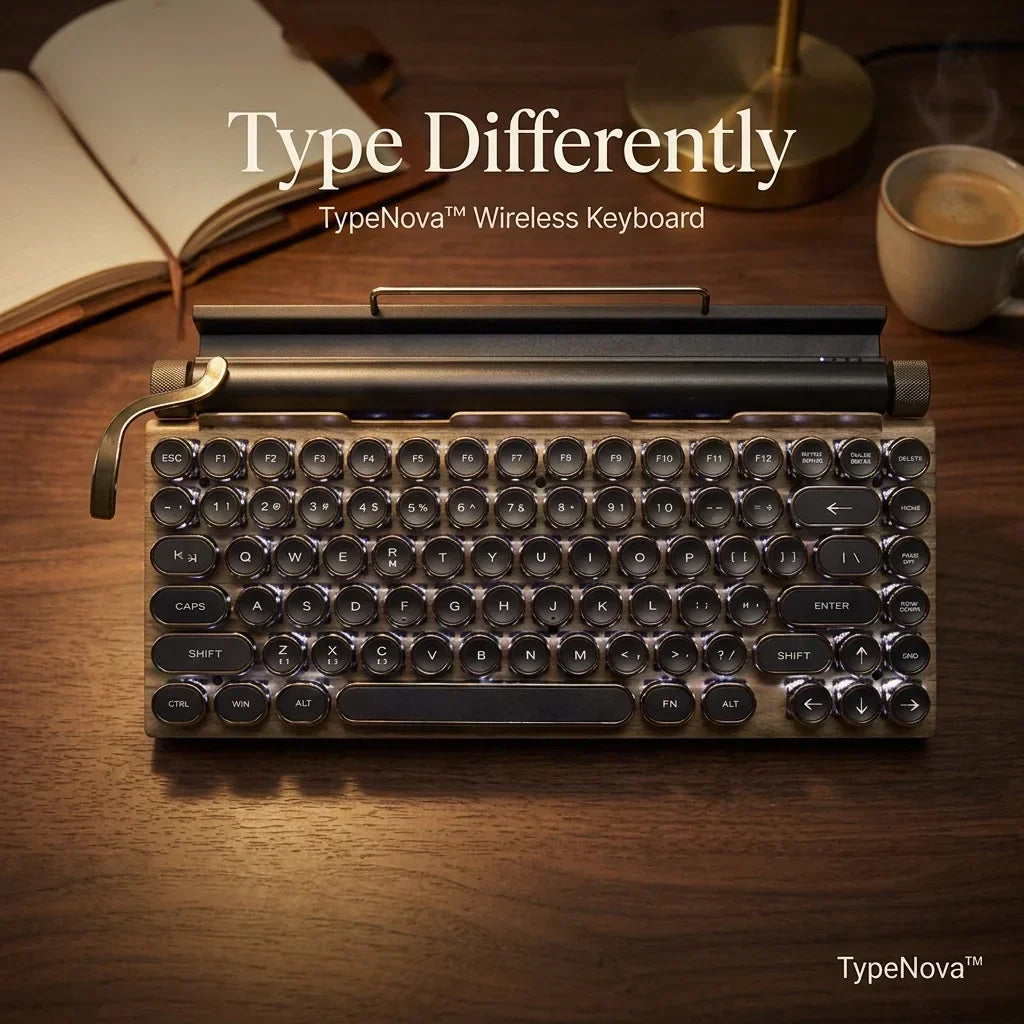
This is a wireless mechanical keyboard built to look and feel like a 1940s typewriter — electroplated round keycaps, an aluminum alloy panel with wood grain finish, a stainless-steel lever that switches backlight modes, dual brass-style knobs for volume and brightness, and blue mechanical switches that click with the same satisfying tactile feedback that made typewriters addictive to use. It connects via Bluetooth 5.0 to three devices simultaneously plus a wired USB-C connection, works with Mac, Windows, iOS, Android, and Linux, and delivers 83 keys of anti-ghosting mechanical input in a compact layout that frees up desk space your full-size keyboard is currently wasting.
At Smart Mouse Co, we curate keyboards with the same obsessive focus we apply to mice — because the tools you touch for 8 hours a day should be chosen with care, not settled for by default. The Retro Typewriter is the centerpiece of our keyboard collection and our single best-selling keyboard for a reason. Here's everything you need to know before buying.
What Makes This Keyboard Different — Every Feature, Explained
Blue Mechanical Switches — The Typewriter Click Is Real

This isn't a membrane keyboard with fake "click" sounds piped through a speaker. It uses genuine blue mechanical switches — the switch type specifically designed for tactile feedback and an audible click on every keystroke. Each key activates with a distinct tactile bump and a sharp click sound that tells your fingers exactly when the keystroke registers. This is the same switch category used by typing enthusiasts, writers, programmers, and anyone who values the physical sensation of typing over the mushy, uncertain feel of membrane keys.
Blue switches are the closest modern equivalent to a real typewriter's keystroke. The actuation force (the pressure needed to register a key) is moderate — firm enough to feel intentional, light enough to sustain for hours. The click provides auditory confirmation of every keystroke, which reduces typing errors because you know — both by feel and sound — that each key registered. For writers, coders, and anyone who types more than they click, blue switches transform typing from a chore into a tactile pleasure.
83-Key Compact Layout — Everything You Need, Nothing You Don't
The Retro Typewriter uses an 83-key tenkeyless (TKL) layout — a full keyboard minus the number pad on the right side. You keep every letter, number, function key, arrow key, and modifier you need. You lose the number pad that 80% of users never touch. The result is a keyboard that's roughly 30% narrower than a full-size layout, which frees up desk space for your mouse, your coffee, or simply a cleaner aesthetic.
The 83-key layout is the sweet spot for most modern users. Programmers keep their arrow keys and function row. Writers keep every key they use. Gamers get a more compact footprint that brings the mouse closer to center. Accountants and data entry professionals who rely on a dedicated number pad can add a separate wireless numpad — but for 80% of keyboard users, 83 keys is everything you need.
Wood Grain Aluminum Alloy Panel — Desk-Grade Build Quality

The top panel is aluminum alloy with an electroplated wood grain finish. This is not plastic with a sticker. It's metal — cold to the touch, rigid under pressure, and significantly heavier and more substantial than the plastic shells that dominate the keyboard market. The wood grain electroplating gives it the warm, vintage aesthetic of a 1940s typewriter without the fragility of actual wood.
The weight matters. A heavier keyboard stays in place during aggressive typing. It doesn't slide, flex, or rattle. The aluminum panel provides a stable platform for the mechanical switches to actuate against — which means every keystroke feels solid and consistent rather than hollow and bouncy. When you type on this keyboard, you feel the difference in build quality immediately.
Electroplated Punk Round Keycaps — The Typewriter Aesthetic
Every keycap is a round, concave, electroplated cap modeled after vintage typewriter keys. The round shape cradles each fingertip. The concave surface (slightly dished inward) guides your finger to the center of each key. The electroplated chrome-style finish catches light and adds a metallic visual accent that flat, printed keycaps can't match.
The laser-engraved legends (letters and symbols) are etched into the keycap surface rather than printed on top. Printed legends wear off after months of heavy use. Laser-engraved legends last the lifetime of the keyboard. Every key will still be readable after years of daily typing.
Pull Lever & Dual Knobs — Physical Controls That Feel Analog

Three physical controls set this keyboard apart from anything else on the market:
- Stainless-steel pull lever — a vintage typewriter carriage-return lever that switches between 14 LED backlight modes. Pull the lever, the lighting pattern changes. It's a functional control that doubles as a design statement. No other keyboard on the market uses a lever for backlight switching.
- Left knob — controls LED brightness. Twist to adjust from off to maximum across 5 brightness levels. No software menu. No Fn key combo. Just twist.
- Right knob — controls system volume. Twist to raise or lower volume on any connected device. Works on Mac, Windows, iOS, and Android without driver configuration.
These analog-style controls exist because navigating software settings menus to change brightness or volume interrupts your workflow. A physical knob delivers the same result in a wrist flick — the way typewriters and audio equipment have done for a century.
Bluetooth 5.0 + USB-C — Wireless and Wired, Your Choice
The Retro Typewriter connects via Bluetooth 5.0 to up to 3 devices simultaneously, with instant switching between them. Pair it to your Mac, your iPad, and your phone — switch with a keyboard shortcut. No re-pairing. No disconnecting and reconnecting. Three devices, always ready.
For users who prefer wired or need to charge while typing, the keyboard also connects via USB-C — the same cable that charges your laptop, phone, and every other modern device. One cable. Universal compatibility. And when it's connected via USB-C, it charges the internal battery while you type, so wireless sessions last longer between charges.
14-Mode LED Backlight — Customizable Glow
White LED backlighting with 14 distinct modes — from static glow to reactive typing effects to wave patterns. Controlled via the pull lever (mode switching) and left knob (brightness). The backlight serves both aesthetics and function — illuminating keys for low-light typing while adding a visual element that makes the keyboard look alive on your desk.
Full Device Compatibility
Works with every major operating system:
- macOS — MacBook, iMac, Mac Mini, Mac Studio, Mac Pro
- Windows — Windows 10, 11, and later
- iOS / iPadOS — iPhone, iPad (all models)
- Android — phones and tablets
- Linux — all major distributions
- ChromeOS — Chromebooks
No drivers required on any platform. Bluetooth pairing takes under 30 seconds. USB-C connection is plug-and-play.
Who Is This Keyboard For?
Writers and Content Creators
If you type for a living — blog posts, articles, scripts, novels, emails, reports — the blue switches and typewriter aesthetic transform typing from a task into an experience. The tactile click provides rhythm. The round keycaps provide comfort. The mechanical feedback provides accuracy. Writers who switch from membrane keyboards to mechanical blue switches consistently report typing faster and more enjoyably.
Desk Aesthetic Enthusiasts
The #desksetup community on Reddit, Instagram, and TikTok has made desk aesthetics a cultural movement. The Retro Typewriter is designed to be the centerpiece of a curated desk — the object that makes visitors say "what keyboard is that?" It photographs beautifully. It matches wood-tone desks, leather desk pads, vintage monitors, and warm-light setups. If your desk is a statement, this keyboard completes it.
Programmers and Developers
Developers who type code for hours need two things from a keyboard: tactile feedback that confirms each keystroke and a layout that keeps arrow keys and function keys accessible. The 83-key layout delivers both. Blue switches provide the typing clarity that helps catch syntax errors in real-time. The compact layout brings the mouse closer to center, reducing the lateral reach that full-size keyboards force.
Remote Workers and Home Office Professionals
Your home office keyboard is visible on every Zoom call. It's the first thing colleagues and clients see on your desk. A retro mechanical keyboard signals intentionality — that you've curated your workspace rather than defaulted to whatever came in the box. The wireless Bluetooth connectivity keeps your home desk clean. The multi-device pairing lets you switch between your work laptop, personal laptop, and tablet without touching a cable.
Gift Buyers
This is a $179 gift that looks like a $300+ artisan piece. For the tech-savvy recipient who has everything — or the writer, designer, or creative who spends their day at a keyboard — the Retro Typewriter is the kind of gift that gets used daily and talked about constantly. It's the keyboard people show to friends and photograph for Instagram. Very few tech products at this price point generate that kind of reaction.
How It Compares to Competitors
| Feature | Smart Mouse Co Retro | Azio Retro Classic | 7KEYS Retro | YUNZII B305 |
|---|---|---|---|---|
| Price | $179 | $170–$220 | $50–$70 | $40–$60 |
| Switches | Blue mechanical | Custom Rymek | Blue mechanical | Membrane |
| Bluetooth | ✅ 5.0 (3 devices) | ✅ 3.0 (3 devices) | ✅ 5.0 | ❌ None |
| USB-C | ✅ Yes | ❌ Micro-USB | ✅ Yes | ✅ Yes |
| Panel material | Aluminum + wood grain | Leather / wood | Plastic | Plastic |
| Physical lever | ✅ Backlight control | ✅ BT/USB switch | ❌ No | ❌ No |
| Volume knob | ✅ Physical knob | ✅ Scroll knob | ❌ No | ❌ No |
| Backlight modes | 14 modes | 5 modes | RGB | None |
| Key count | 83 | 87 | 83 | 104 |
vs Azio Retro Classic ($170–$220): The Azio is the most direct competitor — genuine leather/wood materials, premium build, vintage design. However, it uses older Bluetooth 3.0 (vs 5.0 on the Smart Mouse Co), charges via Micro-USB (vs USB-C), and costs up to $40 more. The Smart Mouse Co Retro delivers comparable aesthetics and build quality with modern connectivity at a lower or equivalent price.
vs budget retro keyboards ($40–$70): The 7KEYS, YUNZII, and other budget retro keyboards look similar in product photos but differ dramatically in hand. Plastic panels instead of aluminum. Inconsistent switch quality. Missing physical controls (no lever, no knobs). The typing experience reflects the price. At $179, the Smart Mouse Co Retro occupies the premium tier where materials and build quality match the visual design — not just the aesthetic wrapper around cheap internals.
Why Buy From Smart Mouse Co?
Amazon lists hundreds of "retro typewriter keyboard" results. Most are generic, unbranded products from manufacturers you've never heard of, with identical product photos across multiple listings and reviews of questionable authenticity. Sorting real quality from dropship filler takes 30+ minutes, and you'll likely still receive something that doesn't match the listing photos.
Smart Mouse Co is a specialist retailer. We don't stock 10,000 SKUs across 50 categories. We curate a focused collection of mice and keyboards — and the Retro Typewriter is our single best-selling keyboard because we've verified the build quality, tested the switches, confirmed the Bluetooth connectivity, and stand behind the product with our own customer support.
Free worldwide shipping. Direct customer support at contact@smartmouseco.com or +1 240-202-9397. Physical address: 200 E Pratt St, Baltimore, MD 21202. When you buy from a specialist with a name, an address, and a phone number — you're buying accountability that anonymous Amazon sellers can't offer.
Frequently Asked Questions
Is a typewriter keyboard good for daily use?
Yes. The Retro Typewriter uses the same blue mechanical switches found in professional keyboards from brands like Cherry, Gateron, and Kailh. The typewriter aesthetic is the visual design — the typing performance underneath is genuine mechanical keyboard quality. Users who type 4–8+ hours daily on this keyboard report the same comfort and accuracy as any high-end mechanical keyboard.
Are blue switches too loud for an office?
Blue switches are audibly louder than membrane keyboards and silent mechanical switches (red, brown). In a private home office or a space where typing sounds aren't an issue, the click is part of the appeal — it's the typewriter experience. In a shared open-plan office, the click may be noticeable to nearby colleagues. For quiet environments, consider pairing this keyboard with a desk mat, which dampens the sound, or use it primarily at your home workstation.
Does this keyboard work with Mac?
Yes. It connects via Bluetooth 5.0 or USB-C to any Mac running macOS. The keyboard is recognized as a standard input device — no drivers needed. Mac-specific keys (Command, Option) may require minor remapping through System Settings → Keyboard → Modifier Keys, which takes 30 seconds.
How long does the battery last?
Battery life varies by backlight usage. With backlighting off, the keyboard lasts weeks between charges. With backlighting on at moderate brightness, expect several days of heavy use. The USB-C connection charges the keyboard while you type, so connecting the cable for a few hours each week keeps the battery topped up indefinitely.
Is $179 expensive for a mechanical keyboard?
In the mechanical keyboard market, $179 is mid-range. Budget mechanical keyboards (Redragon, Royal Kludge) run $30–$60. Mid-range (Keychron, Akko) run $70–$150. Premium (Azio, HHKB, Leopold) run $150–$300+. Custom builds run $300–$1,000+. At $179, the Retro Typewriter sits in the premium tier with the Azio Retro Classic ($170–$220) while offering modern Bluetooth 5.0 and USB-C that the Azio lacks.
Can I use this for gaming?
Yes. The 83-key layout with anti-ghosting supports simultaneous key presses required for gaming. Blue switches provide tactile feedback that many gamers prefer for ability-heavy games (MMOs, strategy, RPGs). For competitive FPS gaming where linear switches (red) are generally preferred for faster repeated inputs, blue switches are playable but not optimized. For everything except elite FPS competition, this keyboard handles gaming well.
What's in the box?
The keyboard, a USB-C charging cable, and a user manual. No dongle required — Bluetooth 5.0 connects directly. No driver disc — plug and play on all platforms.
Conclusion — Your Desk Has a Personality Problem. This Keyboard Fixes It.
You curated your monitor. You chose your mouse with care. You selected your desk, your chair, your lighting. And then you dropped a generic black rectangle in the center of all of it — the one object your hands touch more than anything else, every single day — and accepted that keyboards don't have personality.
They do now. The Retro Typewriter Wireless Mechanical Keyboard delivers genuine blue-switch mechanical typing, Bluetooth 5.0 multi-device connectivity, an aluminum-and-wood-grain build, a physical pull lever and dual knobs, 14 backlight modes, and a 1940s typewriter aesthetic that makes your desk look like it was designed rather than assembled. $179. Free worldwide shipping.
Type Like It's 1945. Connect Like It's 2026.
Retro typewriter aesthetics. Modern mechanical performance. Bluetooth 5.0. USB-C. 83 keys.
- ✓ Blue mechanical switches — real typewriter click
- ✓ Aluminum + wood grain panel — not plastic
- ✓ Bluetooth 5.0 to 3 devices + USB-C wired
- ✓ Pull lever + dual knobs — analog controls
- ✓ $179 · Free worldwide shipping
Shop the Retro Typewriter Keyboard →





Leave a comment
This site is protected by hCaptcha and the hCaptcha Privacy Policy and Terms of Service apply.